professional bio reveal config
professional progression
sabeiro
Created: 2026-10-12 Mon 14:17
:INSTRUCTION: You are a language model to assist different IT projects helping with coding, project planning and documentation. Read the instructions in ~/lav/src/spiega/article/agent_context.org, avoid to write in the chat and let’s communicate via this org files in the folder ~/lav/src/spiega/knowledge/ :ID: reaveal_config
professional bio
This is an overview of my with the links from the blog published in .
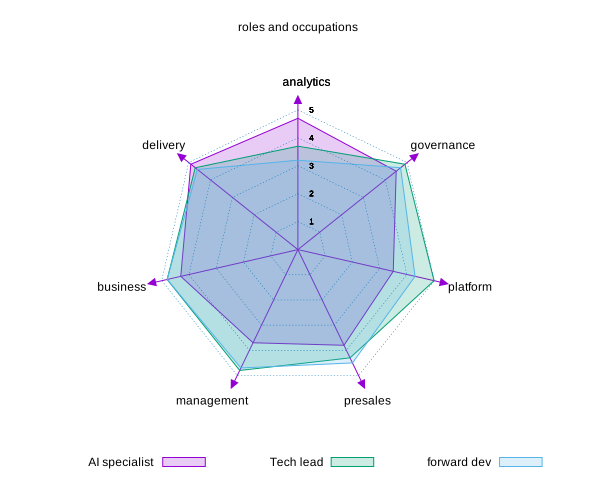
| role | analytics | governance | platform | presales | management | business | delivery |
|---|---|---|---|---|---|---|---|
| AI specialist | 4.7 | 4.5 | 3.5 | 3.8 | 3.7 | 4.3 | 4.9 |
| Tech lead | 3.7 | 4.9 | 5.0 | 4.3 | 4.8 | 4.8 | 4.7 |
| forward dev | 3.2 | 4.7 | 4.3 | 4.5 | 4.7 | 4.8 | 4.6 |
geospatial data elaboration
While working at motionlogic (from Deutsche Telekom) I get involved in many geospatial projects
ride hailing/logistics
At circ/bird/vay
customer contact point
At Afiniti/UK media
- agent_compensation.html
- contact_channel.html
- customer_lifetime.html
- lagged_metrics.html
- offer_segmentation.html
cd ~/lav/src/spiega/markdown/
ls *.html | awk -F'/' '{
     file = $(NF)
     sub(/\.html$/, "", file)
     print "- [[./" $0 "][" file "]] ::"
   }'
create portfolio
We have create_knowledge_base.py which loads all the information about experiences and projects and asks LLMs to create summaries and labels. We use model_local.py to create labels around each item.
We have gen_portfolio.py to convert the yaml atomic info into the website resume.
cd ~/lav/siti/CV/script/
python3 gen_portfolio.py
data project n: 44
websites
To create a website we need the following components
roles
- forward deployed engineer
- career desc
market skills
- 2014: R, hadoop
- 2015: sklearn, hyperparameter tuning, computer vision, NLP
- 2016: Iot, autonomous drive, GIS
- 2017: aws, deep learning, devops
- 2018: SRE/DE, jenkins
- 2019: MLops, terraform, GAN
- 2020: NFT, web3, solidity
- 2021: metaverse, generative, transformers
- 2022: LLM (fine tuning, embedding)
- 2023: LLM (prompting), snowflake, dbt
overall
Strong senior AI profile, but under-positioned for CTO-level leadership. Your CV Score 64 / 100 Weighted overall score: 64. The CV is credible for a senior AI/data infrastructure leader, but it is not yet sharply enough positioned or consistently quantified for a Tech Lead, AI Specialist, or CTO target.
Score Breakdown
Positioning 60
This score is held back by weak explicit targeting: the CV implies senior AI leadership but does not clearly name Tech Lead, AI Specialist, or CTO in the summary. It improves because the recent role and experience narrative are aligned to AI, infrastructure, and leadership, and the skills contain many target keywords.
ATS Compatibility 60
ATS performance is mixed because the CV contains strong keywords and standard section names, but the heavily designed layout, OCR artifacts, and inconsistent dates reduce parsability. A simpler structure would materially improve screening reliability for AI/CTO roles.
Structure & Clarity 60
The two-page length, role chronology, and use of bullets support fast scanning, but visual clutter and inconsistent formatting make the document harder to read than strong senior technical CVs. Recruiters can find the signal, but not as quickly as they should for an executive target.
Quantified Impact 70
The CV includes credible high-scope metrics such as 30M users, 30+ A/B tests, and 3M certified revenue uplift, which is strong for senior AI work. The score is limited because many bullets are descriptive rather than outcome-based, so the measurable impact is not consistent enough across the document.
CV Overview This CV reads as a strong senior AI/data infrastructure profile, but it is not yet sharply positioned for a Tech Lead, AI Specialist, or CTO target. The biggest gap is that the summary and experience emphasize broad technical breadth without enough explicit executive leadership, organizational scope, or CTO-level strategy language.
What is working The experience history shows a credible progression from research and data science into AI lead and platform consulting, which supports senior technical leadership positioning. Several roles contain strong domain signals for the target profile, including AI/LLM, data infrastructure, cloud/on-prem, and team management. The skills section is unusually rich for ATS keyword matching across ML, cloud, ETL, LLM, Kubernetes, and data platforms. Quantified evidence exists in the experience, including 30M users, 30+ A/B tests, and 3M certified revenue uplift, which helps support credibility for senior technical roles. What to improve The summary does not explicitly anchor the CV to Tech Lead, AI Specialist, or CTO positioning, so recruiters may read it as a senior IC profile rather than an executive technical leader. Leadership scope is described, but not in the language CTO/tech lead hiring managers expect, such as org-level ownership, decision-making scope, or business outcome ownership. The profile is very broad across many technologies and industries, which can dilute the narrative for a single target role and make the candidate look like a generalist. Several role bullets are descriptive but not consistently tied to measurable business, product, or delivery outcomes, which weakens senior-level impact signaling.
tips
Hiring managers for Tech Lead and CTO-track roles scan the first lines for seniority, scope, and whether the profile matches the target function. Your current summary is strong on capability but does not clearly signal the target leadership level or the breadth of industries you have actually worked in.
TipLead with role + scope + domain: senior title, years/scope, then the operating environments you’ve owned.
For CTO and Tech Lead roles, recruiters want evidence of both technical leadership and delivery ownership, not just participation in projects. This version better shows leadership, stakeholder management, and platform scope, which are the signals hiring managers look for first.
TipFor leadership roles, write each bullet as ownership of scope, team, and outcome—not just activity.
booklink
Highest Impact Experience Section: booklink + lightmeter/ Y-combinator Your CV vs. recommended Current Consulting early stage start-ups to architect and deliver data infrastructure: storage, interfaces, middlewares, scheduler, messaging, security, redundancy, analytics, BI. Train and implement language models with focus on outreach.
Guideline Example Recommended Advised early-stage startups on architecting and delivering data infrastructure across storage, interfaces, middleware, scheduling, messaging, security, redundancy, analytics, and BI. Trained and implemented language models with a focus on outreach and platform delivery.
Why it matters and how to improve Hiring managers for senior AI/platform roles look for architecture depth and the ability to translate it into delivery. The current bullet is strong technically, but it reads like a task list; this role should more clearly show systems ownership and consulting impact.
TipUse architecture language first, then list the components you owned or advised on.
For CTO-track candidates, hiring managers evaluate whether you can run both technical delivery and commercial accountability. This entry has the right material, but restructuring it around ownership makes the leadership scope more obvious and easier for ATS and recruiters to parse.
TipSeparate team leadership, client leadership, and technical ownership so each responsibility is visible.
Tech Lead and AI Specialist roles need to show applied machine learning and system design in a business setting. This is one of your strongest experience entries, but it should surface the optimization and forecasting angle more directly so the value is immediately clear.
TipIn technical bullets, show the system, the model, and the business decision it enabled.
This is highly relevant to senior AI/data leadership because it demonstrates scale, product ownership, and monetization. Recruiters will respond better if the scale metric and ownership are surfaced earlier and the sentence is cleaner for ATS.
TipPut the biggest scale metric first, then explain what you owned with it.
For senior technical leadership roles, hiring managers look for end-to-end ownership and the ability to translate data into product and commercial outcomes. This bullet is relevant, but the current wording is dense and less scannable than it should be for recruiters.
TipKeep each bullet to one main outcome and one supporting method cluster.
Owned data-driven segmentation for price and ancillary teasers on lufthansa.com, including campaign design, tracking, revenue calculation, reporting, and tool concept development. Led 30+ A/B tests that generated 3M in certified revenue uplift.
Why it matters and how to improve This is one of your clearest business-impact entries and should be prominent because CTO-track reviewers look for measurable commercial outcomes, not just technical delivery. The current content is strong, but the value signal will be stronger if the revenue result is placed more directly against the experiment ownership.
TipFor impact bullets, put the metric as close as possible to the action that created it.
dauvi
Advised SMEs on organizing and collecting company data and on installing cloud-based ERP/CRM systems. Also set up a geo-based rural portal to connect professionals.
Why it matters and how to improve This role is relevant as an early sign of consulting and systems work, but it reads more like a project note than leadership evidence. For experienced-target roles, older roles should be brief and only keep the most transferable scope.
TipOlder roles should prove breadth, not try to compete with your current leadership story. This entry supports your technical depth and computational foundation, which matters for AI specialist and CTO-track credibility. Recruiters will understand it faster if the language is tightened and the publication evidence is kept visible without extra clutter.
TipTechnical depth is strongest when it is precise and easy to scan.
ATS and recruiters for senior technical roles look for relevant keywords in a conventional skills format, not a dense taxonomy. Your current skills section is broad and powerful, but its structure makes it harder to match against CTO/AI leadership job descriptions.
TipGroup skills by hiring signal, not by every tool you know.
ATS systems and recruiters for senior tech roles parse standard section names and simple layouts more reliably. Your current structure is readable to a human, but the customized format may reduce keyword extraction and make the CV slower to scan.
Keep the two-page limit, but convert each role into 2-4 consistent bullets and reduce the length of the top summary block. Make recent roles more detailed than older ones, and keep typography and spacing consistent throughout.
Why it matters and how to improve Hiring managers for CTO-track roles skim for scope, leadership, and impact in seconds; dense paragraphs slow them down. Clear spacing and consistent bullets improve both recruiter reading speed and ATS parsing.
TipIf a section is important, make it scannable; if it is old, make it brief.
Keep the degrees, but consider adding a clearer one-line education block with institution, degree, and field only, and separate workshops/training from formal education. If relevant to target roles, move the strongest training items into a focused Certifications or Professional Development section.
For senior tech leadership roles, education is secondary to experience, but it still needs to be easy to parse. Separating formal education from workshops helps recruiters quickly confirm academic foundation without getting lost in long descriptive text.
TipPut formal degrees in one clean block and training in a separate development section.
Add a short Selected Projects or Selected Achievements section if you want to spotlight the strongest cross-functional or AI delivery work outside the job chronology. Keep only 2-3 entries and make them clearly relevant to leadership, AI delivery, or platform architecture.
For CTO and senior AI roles, a compact projects section can help recruiters see proof of breadth without searching through older jobs. It is especially useful when your experience spans many domains and the best examples are scattered.
TipUse an optional projects section when your best evidence is spread across multiple roles.