agent calling reveal config
sabeiro
Created: 2026-10-12 Mon 14:17
:INSTRUCTION: You are a language model to assist different IT projects helping with coding, project planning and documentation. Read the instructions in ~/lav/src/spiega/article/agent_context.org, avoid to write in the chat and let’s communicate via this org files in the folder ~/lav/src/spiega/knowledge/ :ID: reaveal_config
active agent assistant executive present
We are looking for local agents to support our development. We need to create a simple system to make sure:
- productivity boost
- end-to-end we improve your productivity
- interface
- chat with your model
AI is a crucial component of product life-cycle. I use AI only for things I can test myself and I avoid using it in a chat. AI should be integrated in project files which will serve as documentation and make the product reproducible.
motivation
Agents support with multiple tasks but can get quickly out of control. The setting we build here has the following features:
- local
- all the knowledge sits inside this network and internet is hardly required
- litte resources
- the network is nothing but a laptop and
- automation
- the creation of the knowledge base and graphs is automated
- human tasks
- to ideate and break down tasks, the tools do the rest
- interconnection
- knowledge base is connected with task description, connected with effort estimate, connected with action plan, connected with agenda
- few dependencies
- the project rely on few software: an IDE, python and LLM serving software
- safety
- the LLMs don’t have access to confidential information, the coding agent can see only restricted folders
- cheap
- use the power of your local hardware, no subscription, no fees
- structure
- start thinking at planning first, execution is the least effort
- document
- the single source of truth create a vast documentation to further define tasks
- present
- the same files used for planning create slides and technical documentation
- organized
- access easily all the important configurations in your project
- maintenance
- the code written by agents its over-engineered and it creates a dependency on models to maintain it
setup
Following is a visual representation of the differences between two extremes:
- vibe+public
- you use a software like cursor and you pay a subscription to a public mode
- emacs@local
- you have full control of the deployment and you know exactly what the models can see and edit
v The estimate comes from the following considerations:
- public models
- are much more advanced than local, open-source models
- client IDE
- access all your files
- agents
- it’s really hard to give precise instructions and make sure they respect the boundaries
- coding agent
- each one has different policies but often they overdo and it’s time consuming to get maintainable code
- integration
- the ease of adding tools and capabilities which of course is in favor of open-source
- enhancement
- is the difference between boost in productivity and overview work, sometimes the balance is negative
| conf | consistency | control | privacy | proficiency | integration | overview | versatility |
|---|---|---|---|---|---|---|---|
| vibe+public | 3.7 | 2.5 | 0.5 | 5.0 | 3.7 | 2.7 | 2.5 |
| emacs@local | 4.7 | 4.9 | 5.0 | 3.7 | 4.8 | 4.8 | 5.0 |
local tools
Single tools can improve some features but make other less effective:
- agents
- provide added knowledge but can develop the project in a direction where is difficult to gain control
- coding assistant
- can write useful code and add unknown libraries but can break everything
- skills
- can be dangerous without proper control
- knowledge base
- is essential to maintain consistency but files need to be updated and linked
- REPL
- test on the fly is the best option to avoid never ending testing
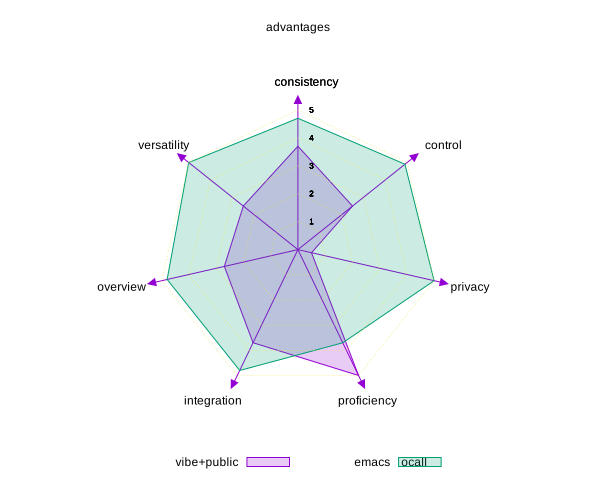
Figure 1: Evaluation of local vs cloud alternatives
Contribution of single tools
| conf | consistency | control | safety | boost | integration | overview | enhancement |
|---|---|---|---|---|---|---|---|
| +gptel | 0 | -0.2 | -0.2 | 0.4 | 0.3 | 0.8 | 0.2 |
| +ellama | 0 | -0.2 | -0.2 | 0.3 | 0.2 | 0.3 | 0.3 |
| +mcp | 0 | -0.2 | -0.2 | 0.2 | 1.0 | 0 | 0.5 |
| +org | 1.0 | 0.3 | 0 | 0.4 | 0.4 | 1.0 | 0.4 |
| +repl | 1.0 | 0.3 | 0 | 0.2 | 0.7 | 0.3 | 0.6 |
| +pi-code | 0 | -0.5 | -0.4 | 0.5 | 0.2 | -0.2 | 0.3 |
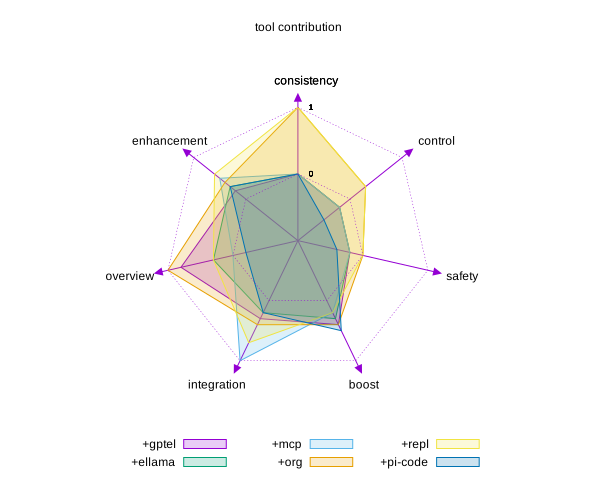
Figure 2: Contribution of the single tools to the project
quadrantChart
    title implementation benefits
    x-axis Low help --> High assistance
    y-axis Low control --> High ownership
    quadrant-1 control and productivity
    quadrant-2 control but useless
    quadrant-3 unpredictable
    quadrant-4 high costs/low ownership
    current setup: [0.6, 0.7]
    public models: [0.9, 0.23]
    no coding agent: [0.30, 0.69]
    no docker: [0.6, 0.34]
    no .org file: [0.40, 0.34]
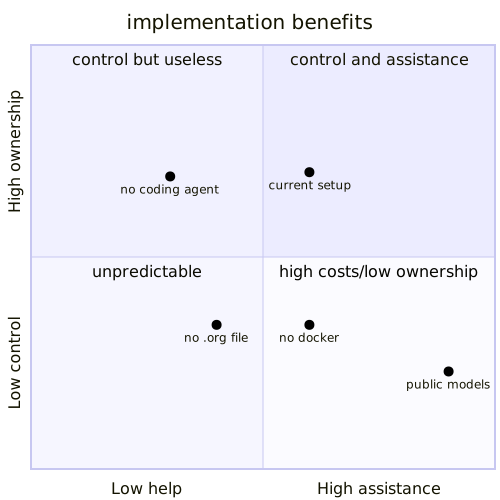
Figure 3: Quadrant representation of the project and its goals
active plan management
A brief representation of the implementation plan
graph LR
A[emacs] --> B[gptel]
A[emacs] --> C[ellama]
agentic components executive
Agents can fulfill many tasks. The work has shifted from the paradigm of executing tasks (and often not document them) to document first what you want to do and plan (or let plan) the agents to execute. The most important task is to test and quality check the results which means to own the pipeline and put enough logs and monitoring tools to allow traceability (know what agent did what) ref1.
We need an interface which is usually an IDE or a terminal to plan and orchestrate everything.
components
Here the choice is:
- IDE
- emacs because you focus on typing and don’t get distracted by useless information
- plan
- .org files: they contain agenda, trees, graphs, attributes, source code… you can basically write a complete software within a file
- LLM
- local because it’s important to own the processes and limit spending
- coding agent
- currently on pi-agent, opencode and aider where not efficient with local models. Aider UX is limited (no autocompletion, messed up my repo)
- MCP
- language models work at best with tools, I keep building MCP servers to ease LLM tasks
- graphs
- all the results are outputted in nodes and links to be visualized and navigated. I use neo4j to store the data
- programming
- mainly in python using REPL functionalities in emacs to test and execute every single line of code and check the data results
- deploy
- all the resources with so I can easily move them around
- hardware
- local: laptop and jetson (desc: )
Here is a sketch of the project
---
title: implementation sketch
---
flowchart LR
KN["`
script
knowledge
agenda
links
tasks
`"]
DOC@{ shape: docs, label: "Knowledge"}
MC@{ shape: procs, label: "mcp server"}
DT@{ shape: lin-cyl, label: "storage" }
EL@{ shape: notch-pent, label: "ellama" }
GP@{ shape: notch-pent, label: "gptel" }
PI@{ img: "/home/sabeiro/lav/src/spiega/icon/dev.svg", label: "pi-coding", pos: "c", w: 60, h: 60, constraint: "off" }
%%A@{ icon: "fa:user", form: "square", label: "User Icon", pos: "t", h: 60 }

E(emacs) --> GP
E --> EL
E -- ask --> EL
EL -- connect --> OL[\ollama\]
OL -- answer --> EL
EL -- insert --> E
GP -- connects --> MC
MC -- summarize --> DOC
GP -- decide --> JT[\vllm\]
JT -- elaborate --> GP
GP -- insert --> E
E -- debug --> PI
PI -- write --> DT
PI -- edit --> E
E -- edit --> OR[org-file]
OR -- contain --> KN

Figure 4: diagram of the implementation
The documentation is generated inside this
MCP
We use different MCP in this project
blender MCP
Considering the safety requirements for this project (local models and coding assistant inside a container with limited volume access) we use the following integration:
- LLM
- served on host by lemonade to grant more access to hardware (CPU, GPU, NPU)
- coding assistant
- inside a docker container called mcp_server within webserver-net network
- a blender mcp server
- to launch a server at port 9876
- a blender mcp addon
- to launch the server from blender
- a blender_mcp_client
- to interact with a coding agent on 9191
- a blender instance
- running on host
- socat
- bridging webserver-net with host routing 9192 (docker) to 9191 (host)
flowchart TD
    subgraph Host ["Host Machine"]
        LLM[LLM Service<br/>Lemonade]
        Blender[Blender Instance]
        Socat[Socat Bridge<br/>9192 Docker <-> 9191 Host]
    end

    subgraph Docker ["Docker Network: webserver-net"]
        Container[mcp_server<br/>Container]
        Server[Blender MCP Server<br/>Port 9876]
    end

    subgraph Interaction ["User/Software Interaction"]
        Addon[Blender MCP Addon]
        Client[Blender MCP Client]
    end

    %% Relationships
    Blender -- "Runs on" --> Addon
    Addon -- "Launches" --> Server
    Server -- "Listens on Port 9876" --> Container
    Container -- "Network Routing" --> Socat
    Socat -- "Bridges 9192 to 9191" --> LLM
    Client -- "Interacts with Coding Agent" --> Server
    LLM -- "Hardware Access" --> Host

project management
A few tools for project management using org and agents.
gantt for the project
A Gantt representation of the project
---
displayMode: compact
title: Ignored if specified in chart
config:
  gantt:
      useWidth: 800
      rightPadding: 0
      topAxis: true  #false
      numberSectionStyles: 2
---
gantt
    dateFormat  <YYYY-MM-DD>
    title  Knowledge base action plan
    excludes  weekends

    review : vert, v1, <2026-06-22>, 1d

    section local models
        deploy LLMs          :done,  deploy, <2026-05-20>, 7d
        coding agent         :done,  deploy, <2026-05-27>, 14d

    section list & summarize
        parse knowledge         :done,  dev, <2026-06-01>, 5d
        create graphs           :done,  dev, <2026-06-07>, 7d

    section hierarchy
        hierarchy     :done, distil, <2026-06-16>, 9d
        visualization :crit, distil, <2026-06-20>, 4d

    section video
        sceencast    :active, create, <2026-06-12>, 5d
        animate text :active, create, <2026-06-17>, 9d

    section publish
        content     :active, share, <2026-06-22>, 10d
        publication :milestone, share, <2026-06-27>, 5d
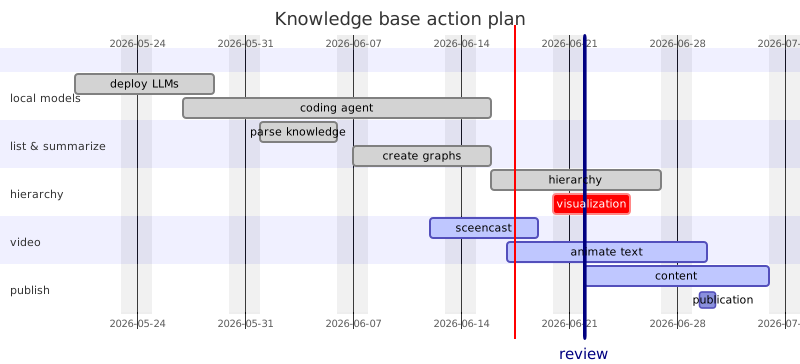
Figure 5: Gantt representation of the project
Kanban
We can as well integrate our workflow into a Kanban
---
config:
  kanban:
    ticketBaseUrl: 'https://mermaidchart.atlassian.net/browse/#TICKET#'
---
kanban
  Todo
    [compare model serve]
    docs[benchmark vllm, llama.cpp and ollama]
  [In progress]
    id6[blog posts about the local implementation ]
  id9[Ready for deploy]
    id8[cloud webdav]@{ assigned: 'bot1' }
  id10[Ready for test]
    id4[Create parsing tests]@{ ticket: MC-2038, assigned: 'K.Sveidqvist', priority: 'High' }
    id66[last item]@{ priority: 'Very Low', assigned: 'knsv' }
  id11[Done]
    id5[agent confs, org files]
    id2[local deployment]@{ ticket: MC-2036, priority: 'Very High'}
    id3[graph integration]@{ ticket: MC-2037, assigned: bot1, priority: 'High' }

Figure 6: Gantt representation of the project
sankey
We can show sankey diagrams too
---
config:
  sankey:
    showValues: false
---
sankey

LLM cloud,LLM local,95
cursor,pi-coding,60
cursor,aider,20
cursor,open-code,20
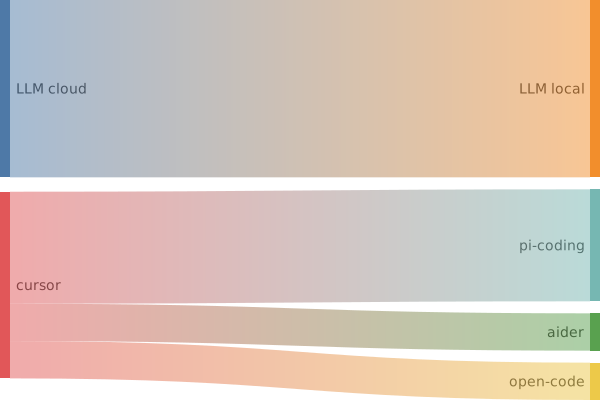
Figure 7: Sankey representation of the project
timeline
We can present as well a timeline regarding the development of this project
timeline
    title blender twin development
    2025-12-12 : nvidia jetson CV application
    2026-01-12 : camera controller with pose estimate
    2026-02-12 : physics optimization engine in js
    2026-03-12 : moving from cloud to local LLMs
    2026-04-12 : new laptop to run local + jetson
    2026-05-12 : .org files and productivity workflow
    2026-06-12 : knowledge graph
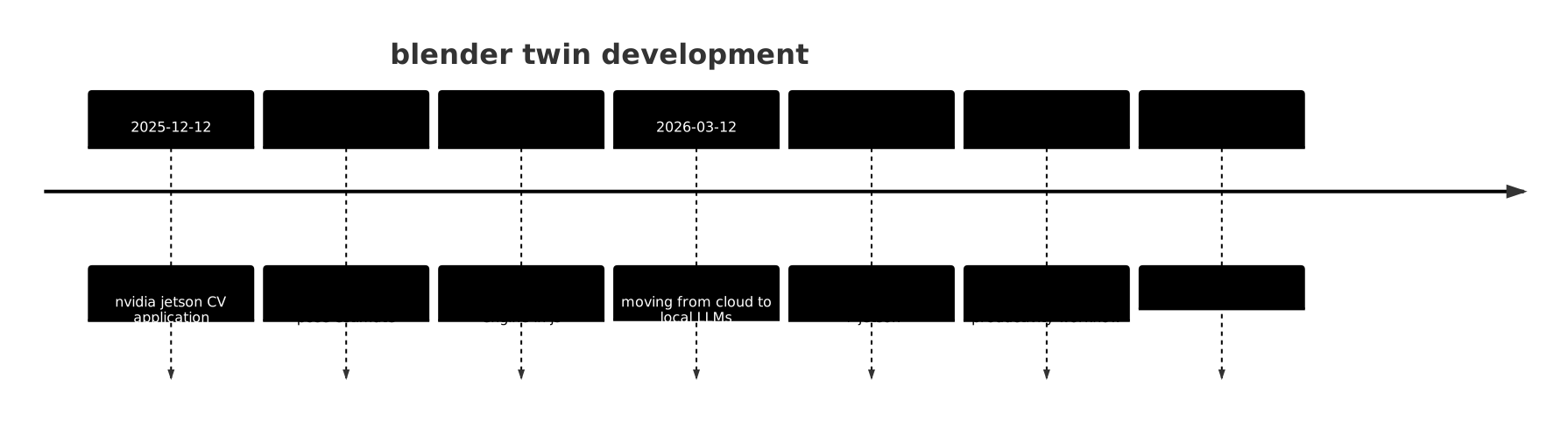
Figure 8: Timeline
done architecture architecture
Architectural diagram for the project:
flowchart TD
    subgraph Sensors ["IoT Sensor Layer"]
        A[Temperature Sensors] -->|MQTT| B[Messaging Bus]
        C[Humidity Sensors] -->|MQTT| B
        D[Pressure Sensors] -->|MQTT| B
    end

    subgraph Processing ["Processing Layer"]
        B -->|Ingest| E[Data Stream Processor]
        E -->|Normalize| F[Time Series DB]
        E -->|Transform| G[Feature Extractor]
        G -->|Analyze| H[Anomaly Detector]
    end

    subgraph Intelligence ["Intelligence Layer"]
        H -->|Alerts| I[Predictive ML Model]
        I -->|Predictions| J[Decision Engine]
        F -->|Historical Data| K[Knowledge Graph]
    end

    subgraph Visualization ["Visualization Layer"]
        J -->|Commands| L[Control Actions]
        K -->|Entity Relations| M[Graph Database]
        E -->|State Updates| Q[3D WebGL Viewer]
        Q -->|Render| R[Blender Scene]
    end

    subgraph Twin ["Digital Twin Model"]
        R -->|Sync| V[Physics Simulation]
        V -->|Thermal Analysis| W[Heat FEM Solver]
        W -->|Results| Q
    end

    style Sensors fill:#e1f5fe
    style Processing fill:#fff3e0
    style Intelligence fill:#e8f5e9
    style Visualization fill:#f3e5f5
    style Twin fill:#ffe0b2
    linkStyle default stroke:#333,stroke-width:2px

Figure 9: result of mermaid plot
done models dev
Using mainly ollama (with llama cpp took a lot of time for configuration) to serve LLMs. Ollama has a nice interface for python which basically removed all my external dependencies from langchain and llamaindex (which keeps on changing APIs and packaging and my code needs to be re-written over and over). I currently manage to run:
- `qwen2.5-coder:3b`
- I use it a lot for summarization tasks, it’s quick but sometimes output trivial content
- `qwen3.5:9b`
- The least thinking model I can use
- `qwen3.6:latest`
- At the hardware limits of my local setup, it is not worth it the waiting, few tokens per second
- `llama3.2:latest`
- `codegemma:7b`
- `deepseek-coder:6.7b`
- `gemma4:latest`
- `dolphin-mistral`
We tested as well other LLM serving toos: The current LLM serving tools tested
- ollama
- criticized as professional tool but really easy to implement. It integrates nicely with pi-coding and I completely removed my langchain dependencies thanks to the API completeness especially regarding the json formatted output
- lm_studio
- UI is pretty useless but the token/s speed is really high and I need to find a headless alternative
- vllama
- still hitting VRAM limitation
- llama.cpp
- pretty hard to deploy especially on ARM on the jetson but should be pretty efficient. I find really frustrating the experience of downloading models from hugginface where search is pretty useless, it’s hard to navigate between models and hard to download the correct version of the model. Ollama made it really easy
done coding assistant present dev
The current coding assistant is on pi-agent while opencode, aider and cursor where also tested.
- pi-agent
- currently the running options because it’s more efficient for local models. It reduces the load and unload of files and the number of tokens.
- cursor
- is not opensource and I can’t integrated in my workflow. Cursor itself said that with using python REPL emacs it’s the best option
- aider
- I find it less invasive than opencode but struggles to perform simple operations and creates a lot of junk in the folder
- opecode
- a bit too invasive for my taste, it takes too many autonomous decisions making it difficult to control
The current configuration uses pi-coding and the configuration is specified in agent instructions:
- rules
- how the agent should behave in this project
- AGENTS.html
- what types of agents we need
- SYSTEM.html
- what is the system configuration
- SYSTEM_APPEND.html
- further agent defitions
- SKILLS.html
- skillset for agents
- commands
- ESC to stop the current operation, /q to quit
- security
- pi runs inside the same container as ollama with the same user as the host system. Mounted is only the src directory so pi cannot access critical information like passwords, keys… and cannot run any docker command which can easily get to sudo rights
active deploy
Here we explore different options to deploy local models, the only common denominator is docker because we want to control what those models can access and reduce context. Many services have docker options but the pre-built images are difficult to integrate in our workflow and the proposed images are heavy and hard to tune. To find a performant solution we decided to start from a “yeast” image following simple principles:
- Dockerfile
- static starts from the same ubuntu image, install the dependencies, adds the /app folder and grant permissions. Building a container takes time and we want only the static information to be in the image
- docker-compose.yml
- dynamic includes the network, health-check, volumes, environment variables, launches the app. We need a quick way to test and change the configuration.
The build time takes 10min to 1h so we really need to separate the static components from the dynamic one. We want to standardize the process because unfortunately every service has its own: folder structure, endpoints, configuration files, ports, enviroment… Here I force all the different project to be reachable from the host in a similar way to avoid re-writing patches and integration tools. Additionally part of the hardware we use runs on ARM so we need to build our own images.
Dockerfile
The “yeast” start from a ubuntu image and installs basic libraries
FROM ubuntu:latestRUN apt-get update && apt-get install -y localesRUN apt install -y curl libatomic1 python3-pip bash git#&& rm -rf /var/lib/apt/lists/*#RUN localedef -i en_US -c -f UTF-8 -A /usr/share/locale/locale.alias en_US.UTF-8ENV LANG en_US.utf8
We copy the app files into the container
COPY ./app /appRUN chmod +x /app/run.shWORKDIR /app
We need then to allow the container user to edit the files keeping the same permission as the host user to allow coding assistants to edit the files keeping the same consistency. Unfortunately this step is not easy in docker for reasons I don’t understand but I found a workaround ref1.
ARG UID=1000ARG GID=1000RUN usermod -l $USER ubuntuRUN usermod -aG ubuntu $USERRUN usermod -aG $USER $USERRUN usermod -d /home/$USER/ $USERRUN usermod -s /bin/bash $USERRUN groupadd $USER
We grant sudo and no password:
RUN passwd --delete sabeiroRUN echo '%sudo ALL=(ALL) NOPASSWD:ALL' >> /etc/sudoersRUN adduser sabeiro sudoRUN mkdir -p /home/sabeiro/ && chown -R ${UID}:${GID} /home/sabeiro/USER sabeiroRUN sudo ls
We need to add to docker-compose.yml to mount the volume as non-root
user: "${UID}:${GID}"
On top of this image we install some applications
RUN curl -fsSL https://openclaw.ai/install.sh | bash -s -- --no-prompt --no-onboardRUN curl -fsSL https://pi.dev/install.sh | bash -s -- --no-prompt --no-onboardRUN curl -fsSL https://opencode.ai/install | bash -s -- --no-prompt --no-onboardRUN curl -LsSf https://aider.chat/install.sh | bash -s --RUN curl -fsSL https://unsloth.ai/install.sh | sh
And we build the image
docker compose up --build
We then test the configuration using bash inside the container
docker compose exec -it ubuntu bash
docker-compose.yml
Docker compose here starts the container built in the previous step
services:ubuntu_base:build:context: ./dockerfile: Dockerfilecontainer_name: ubuntu_basedeploy:resources:reservations:devices:- driver: nvidiacount: allcapabilities: [gpu]runtime: "nvidia"ports:- "8083:8083"restart: unless-stoppedstdin_open: truetty: trueworking_dir: /app/entrypoint: ["bash","/app/run.sh"]healthcheck:test: ["CMD", "cat", "/app/run.sh"]interval: 30stimeout: 30sretries: 3volumes:- ${HOME}/Downloads/llm_model/:${HOME}/models/- ${HOME}/lav/src/:${HOME}/lav/src/- ${HOME}/log/ubuntu/:/var/log/- ./app/:/app/- /var/run/docker.sock:/var/run/docker.socknetworks:- webserver-netnetworks:webserver-net:name: webserver_webserver-netdriver: bridgeexternal: true
Network and webserver are on a separate container
services:nginx:container_name: nginxbuild:context: nginx/restart: unless-stoppedtty: truecpus: 0.2environment:SERVICE_NAME: appSERVICE_TAGS: devvolumes:- ./nginx/conf.d:/etc/nginx/conf.d- ${HOME}/lav/siti:/var/www/html/- ${HOME}/log:/var/log/ports:- "80:80"- "443:443"networks:- webserver-net
devices
We use GPUs in this project
deploy:resources:reservations:devices:- driver: nvidiacount: allcapabilities: [gpu]runtime: "nvidia"
We can as well limit RAM and CPU resources which we tune restarting the containers.
volumes
Volumes are managed by docker-compose, we use a standard structure:
- app
- all the files we need to run the service
- log
- mount a /log directory where all services can write logs separated from the repo
- edit
- we mount the source files the agents should be able to access with the same permissions as the host user
- conf
- all the configuration files we need to export to the app in the guest
- static
- a folder outside of the repo where we download and share big files like LLM models
network
We use a webserver-net network to connect the different containers. This network is managed from the nginx container. To let the host and the container to communicate we could use socat.
services:blender-mcp-bridge:image: alpine/socat:latestcontainer_name: blender-mcp-bridgenetwork_mode: "host"command: TCP-LISTEN:9192,fork,reuseaddr TCP:127.0.0.1:9191restart: unless-stoppedlemonade-mcp-bridge:image: alpine/socat:latestcontainer_name: lemonade-mcp-bridgenetwork_mode: "host"command: TCP-LISTEN:13306,fork,reuseaddr TCP:127.0.0.1:13305restart: unless-stopped
agents
To allow the agents to work on the host system we need different workarounds:
- tty
- we need to allow console interactions
- permissions
- we use the same username as the host
- network bridge
- to use external programs on host like blender
deploy on docker
All the LLM services like ollama, llama.cpp, unsloth, lmstudio… have docker versions we can use but those implementations can be barely used outside of testing since the real added value of LLM is the combination with a coding assistant. Ollama is by far the most easy to integrate tool, their APIs are included in many packages and you can integrate
hardware
This is the Main Laptop for LLM Workloads but we want to deploy our local agents on other devices as well. Those are the main specs.
| Component | Specification |
|---|---|
| CPU | AMD Ryzen 7 260/7 (16 cores, 32 threads) |
| GPU | NVIDIA GeForce RTX 5060 (8GB GDDR6) |
| Driver | NVIDIA 595.71.05 |
| CUDA | CUDA 13.2 |
| RAM | 30GB DDR5 |
| iGPU | AMD Radeon 780M integrated |
| Storage | 1TB SSD / NVMe |
| OS | Ubuntu 22.04 LTS |
| NPU | 16 TOPS |
| Multi-GPU | Host has additional GPUs (if any) |
backends
We have different backends to explore:
- ROCm
- Open software stack that includes programming models, tools, compilers, libraries, and runtimes for AI and HPC solution development on AMD GPUs
- CPU
- cuda
- allows software to use certain types of graphics processing units for accelerated general-purpose processing
- vulkan
- next generation graphics and compute API that provides high-efficiency, cross-platform access to modern GPUs used in PCs, consoles, mobile phones and embedded platforms.
todo CPU
Generally the GPU is a better option for LLM but the CPU can access 32GB of memory.
todo GPU
To use the nvidia graphic cards I need to install many packages
ROCm
From linuxvox.
sudo apt update && sudo apt upgrade
sudo mkdir --parents --mode=0755 /etc/apt/keyrings
wget https://repo.amd.com/rocm/packages-multi-arch/gpg/rocm.gpg -O - | \
    gpg --dearmor | sudo tee /etc/apt/keyrings/amdrocm.gpg > /dev/null

sudo tee /etc/apt/sources.list.d/rocm.list << EOF
deb [arch=amd64 signed-by=/etc/apt/keyrings/amdrocm.gpg] https://repo.amd.com/rocm/packages-multi-arch/ubuntu2404 stable main
EOF
sudo apt update
sudo apt install rocm
sudo usermod -a -G render,video $LOGNAME
pip install torch torchvision --extra-index-url https://download.pytorch.org/whl/rocm7.2/
done NPU
Nowadays laptops have NPU (neural processing units) but it is generally difficult to use them the same way they are used in cell phones. The recommended size for LLM application is 40 tops but I should be able to use my 16 tops for light tasks like autocompletion. The idea is to use fast flow lm with this implementation Let’s try to follow this guide and the official documentation. Need to download the drivers.
Ubuntu 26 has the package lemonade: run LLMs and Whisper on the AMD XDNA 2 NPU. This solution is made up of:
- Upstream NPU driver in the Linux 7.0+ kernel (with backports for 6.xx kernels).
- AMD IRON compiler for XDNA NPUs.
- FastFlowLM, a lightweight LLM runtime for AMD NPUs, which today has added Linux support.
- Lemonade, ties everything together with a streamlined user experience.
sudo apt update
sudo apt install python3.12 python3.12-venv libboost-filesystem1.74.0 dkms
sudo apt update && sudo apt install linux-oem-24.04c
cd /home/sabeiro/Elŝutujo
unzip RAI_1.8_Linux_NPU_XRT.zip
sudo apt install --fix-broken -y ./xrt_202620.2.25.37_24.04-amd64-base.deb
sudo apt install --fix-broken -y ./xrt_202620.2.25.37_24.04-amd64-base-dev.deb
sudo apt install --fix-broken -y ./xrt_202620.2.25.37_24.04-amd64-npu.deb
sudo apt install --fix-broken -y ./xrt_plugin.2.25.260102.56.release_24.04-amd64-amdxdna.deb
source /opt/xilinx/xrt/setup.sh
xrt-smi examine
Need to download ryzen ai.
cd /home/sabeiro/Elŝutujo
mkdir ryzen_ai-1.8.0
cp ryzen_ai-1.8.0.tgz ryzen_ai-1.8.0
cd ryzen_ai-1.8.0
tar -xvzf ryzen_ai-1.8.0.tgz
Dependencies for docker git clone https://github.com/hpenedones/fastflowlm-docker.git cd fastflowlm-docker docker build -t fastflowlm .
sudo add-apt-repository ppa:amd-team/xrt
sudo apt update && sudo apt install libxrt-npu2
# Set memlock to unlimited (needs reboot)
echo -e "* soft memlock unlimited\n* hard memlock unlimited" | sudo tee -a /etc/security/limits.conf
sudo reboot
git clone https://github.com/hpenedones/fastflowlm-docker.git
cd fastflowlm-docker
docker build -t fastflowlm .
lemonade
Between ollama, llama.cpp, unsloth, vllm the best experience was with lemonade. Lemonade has a simple UI able to manage:
- llama.cpp
- for serving LLM
- vllm
- for serving LLM
- whisper
- talk2text
- stable diffusion
- image generation
- ROCm
- for amd
- cuda
- nvidia drivers
- onnx
- custom models
- vulkan
- cross platform API for 3D (like openGL)

set-up
Config config.json
mkdir -p ~/Dowloads/llm_model/lemonade
sudo chown -R lemonade:lemonade ~/Dowloads/llm_model/lemonade
lemonade config set models_dir=~/Downloads/llm_model/lemonade
sudo service lemond start
lemonade pull Qwen3-Coder-30B-A3B-Instruct-GGUF
settings
The setting models_dir=auto means hugging face defaults will be used
export HF_HOME="~/Downloads/llm_model/"
export HF_DATASETS_CACHE="~/Downloads/llm_cache/"
lemonade config
Server Configuration------------------------------------------------------------------------[General]_generated GENERATED by docs/tools/gen_backend_boilerplate.py -- do not hand-edit per-recipe sections (they come from each backend's descriptor config_defaults()). Global keys are hand-maintained in this file. Regenerate and verify with that script; CI --check fails on drift.allowed_origins (empty)auto_check_model_updates trueauto_evict false
lemonade list
LocalModel Name Downloaded Size (GB) Details----------------------------------------------------------------------------------------------------ACE-Step-Music Yes 10.50 acestepGemma-4-12B-it-GGUF Yes 6.80 llamacppLMX-Omni-5.5B-Lite Yes >8.34 collection.omniLlama-3.2-3B-Instruct-GGUF Yes 1.92 llamacppMiniCPM-o-2.6-Vision-GGUF Yes 5.33 llamacpp
lemonade status
Server is running on port 13305Property Value--------------------------------------------------Version 2026.40.0WebSocket Port 9000Max Models/Type 1Model Type Device Recipe Ctx Status Checkpoint-----------------------------------------------------------------------------------------------------------------------Qwen3-Coder-30B-A3B-Instruct-GGUFllm gpu llamacpp 4096 ready unsloth/Qwen3-Coder-30B-A3B-Instruct-GGUF:Qwen3-Coder-30B-A3B-Instruct-Q4_K_M.gguf
lemonade bench Qwen3-Coder-30B-A3B-Instruct-GGUF Qwen3.5-9B-GGUF
lemonade config set extra_models_dir="~/Downloads/llm_model/"
Configuration updated:
{
    "extra_models_dir": "~/Downloads/llm_model/"
}
lemonade launch pi -m Qwen3-Coder-30B-A3B-Instruct-GGUF
jev
Let’s try to have jev running on lemonade.
cd ~/Downloads
curl -fsSL https://bun.com/install | bash
git clone https://github.com/githubnext/localjev.git
cd localjev
bun install
todo benchmark
Now let’s test the configuration and check what performs at best. We have tested:
- ollama
- 11434
- unsloth
- 8889
- lmstudio
- llama.cpp
curl localhost:11434/api/tags | jq | grep \"model\" | awk -F " " '{print $2}'
| qwen3.5:9b | |
| qwen2.5-coder:7b | |
| qwen2.5-coder:3b |
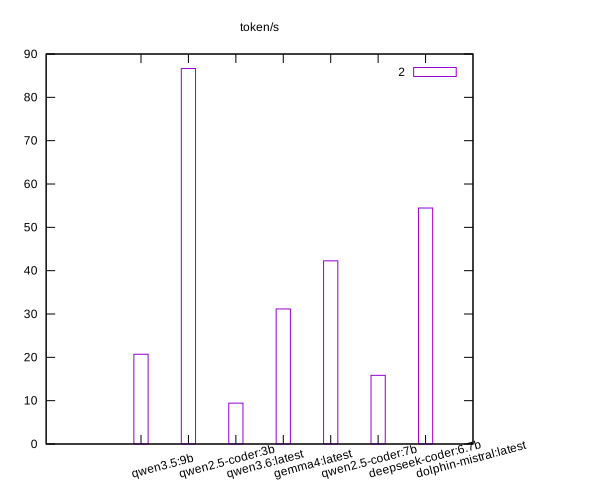
Figure 11: ollama results
profiling
Performances are crucial for a real added value and we need to make sure the system is well-configured. Coding agents are not effective, they keep trying until tests pass so speed is crucial.
- Two llama-server instances running on ports 57569 and 54001 (both serving the same model)
- Swap is actively being used (3GB + 2.9GB = 5.9GB out of 8GB available)
- GPU utilization at 0% - The servers are not using GPU efficiently
configuration analysis
active microcontroller
The microcontollers are the eyes and ears of the LLMs. We need to extend our MCP network to access and link the different devices so we can enhance our capabilities to the physical world. Here is the list of the we use. For that we need:
- microcontrollers
- ESP32, arduino, teensy
- sensors
- motion, temperature
- camera
- ESP32, jetson raspy HD
- webserver
- ESP32 to expose an endpoint our MCP server can call
- interface
- BLE midi is really versatile
Based on the system monitoring, here are the findings:
Hardware Resources
- GPU: NVIDIA GeForce RTX 5060 Laptop GPU (8151 MiB VRAM)
- RAM: 30 GB total, ~5.4 GB available
- CPU: AMD Ryzen 7 260 (16 cores)
- Model: Qwen3.5-9B-GGUF (~9 GB compressed, needs offloading to RAM)
Performance Bottlenecks Identified
- Swap Memory Active ⚠️ Critical
- 3GB of /swapfile + 2.9GB of /swap.img in use
- Swap swapping kills LLM performance by orders of magnitude
- Swappiness is set to 60 (too high for LLM workloads)
- Redundant Unsloth Instances ⚠️ High Waste
- Instance 1: Port 8888, `–parallel 1`, low utilization
- Instance 2: Port 54001, `–parallel 2`, active but suboptimal flags
- Both serving the same model unnecessarily
- Context Length Mismatch
- Server running with `-c 22528` (half of max)
- Could benefit from higher batch size for throughput
optimization steps
- Step 1
- Disable Swap Memory: Swap memory is the #1 killer of LLM performance. When RAM fills up, data moves to disk at ~20-100 MB/s vs GPU VRAM’s 500 GB/s.
Temporary fix:
sudo swapoff -a
Permanent fix: Add to `/etc/rc.local` or create `/etc/systemd/system/disable-swap.service`:
[Unit]
Description=Disable Swap for LLM Workloads

[Service]
Type=oneshot
ExecStart=/bin/sh -c 'swapoff -a'
RemainAfterExit=yes

[Install]
WantedBy=multi-user.target
Reduce swappiness (optional):
sudo sysctl vm.swappiness=10
# Make permanent in /etc/sysctl.conf:
vm.swappiness=10
vm.vfs_cache_pressure=50
- Step 2
- Stop Redundant Unsloth Server
Find and kill the port 8888 server:
pkill -f "unsloth run.*port 8888"
# or
kill $(pgrep -f "unsloth run.*--port=8888")
- Step 3
- optimized configuration file optimized
Step 4: Adjust for Your Hardware (RTX 5060 Laptop)
Your GPU has 8 GB VRAM but Qwen3.5-9B needs more than that. Here’s the optimal configuration:
For Qwen3.5-9B-GGUF:
python unsloth run \
  -H 127.0.0.1 \
  -p 8889 \
  --model unsloth/Qwen3.5-9B-GGUF \
  --context-length 32768 \
  --parallel 4 \
  --max-batch-size 4 \
  --flash-attn on \
  -c 32768 \
  -ngl -1 \
  --kv-unified off \
  --metrics
Key optimizations:
- `–kv-unified off`: Disables KV cache unification (better for single GPU)
- `–parallel 4`: Enable concurrent requests (you have RAM headroom)
- `–max-batch-size 4`: Process multiple tokens in parallel
- `-c 32768`: Full context utilization
### Step 5: Monitor and Tune
Check performance metrics:
# Watch GPU usage
watch -n 1 nvidia-smi

# Check for swap activity
watch -n 1 "free -h && swapon --show"

# Monitor Unsloth server
curl http://localhost:8889/metrics | grep -E "tokens|time|iters"
Expected improvements:
- Tokens/second: Should increase from ~15 to ~25-30 tokens/sec
- Latency: First token should drop from 500ms to ~200ms
- Throughput: Sustained throughput could reach 40-60 tokens/sec with `–parallel 4`
### Step 6: Alternative - Use Ollama Instead
If Unsloth continues to be slow, consider switching to Ollama which is better optimized for single-GPU laptop setups:
# Stop Unsloth
pkill -f unsloth

# Start Ollama (already configured in your system)
ollama serve

# Pull quantized model (less VRAM usage)
ollama pull qwen3.5:9b
Ollama benefits:
- Better single-GPU optimization
- Lower overhead (~10-15% faster for single user)
- Less memory footprint
- Simpler configuration
### Quick Performance Checklist
- VRAM sufficient (8 GB for 9B model) ⚠️ Model will partially offload to RAM
[ ]Swap disabled CRITICAL[ ]Redundant servers stopped[ ]`–parallel` increased to match workload[ ]Batch size tuned for throughput[ ]Flash Attention enabled ✓[ ]Context length optimized ✓
### Model Recommendations for Your Hardware
| Model | VRAM Need | Recommended | Performance |
|---|---|---|---|
| Qwen3.5:9B | ~8.5GB + RAM | ✅ Current choice | Good balance |
| Qwen2.5-coder:7B | ~6GB | ✅ Better option | Faster, good for code |
| Qwen3.6:latest | >12GB | ❌ Too slow | Hardware limit |
| CodeGemma:7B | ~6GB | ✅ Fastest | Great for coding |
Best recommendation: Switch to `qwen2.5-coder:7b` or `codegemma:7b` for 30% faster performance with same quality for coding tasks.
### Emergency Commands
# Stop all Unsloth instances
pkill -f unsloth

# Check current GPU memory usage
nvidia-smi --query-gpu=index,memory.used,memory.total --format=csv

# Restart with optimized settings
~/unsloth_optimized.sh &

# Force stop if frozen
sudo fuser -k 8889/tcp

# Monitor swap (should be empty)
watch -n 1 "free -h | grep Swap"
active mcp for code dev present dev
I currently have the following mcp servers:
- blender-mcp
- to use blender from emacs
- proj desc
- alternative
- proj desc 2
- alternative
- proj desc 3
- alternative
- blender mcp with client
- alternative
- integration llama.cpp
- alternative
- jetson-mcp
- a custom mcp server running on a nvidia jetson using computer vision capabilities with pytorch
- bottino-mcp
- a custom mcp server running locally on this laptop
- mcp-hub
- additional gptel tools administrated by mcp_server
done emacs present
Emacs is omnipresent in my developments . Emacs integrates bash commands with macros and program outputs, I can connect language models with mcp servers. I currently use emacs.el as current init file and gptel_tools.el for connecting with mcp. gptel_tools_allowed commands is an additional list of bash commands which the tool allows
Features:
- LLMs
- I use different packages to interact with the local models
- ellama
- for reasoning and structuring the project and for code examples in any buffer
- gptel
- for the integration with mcp
- gptel base
- base package
- mcp.el
- start the hub
- custom gptel tools
- user defined tools
- gptel-mcp
- integration between the packages
- mcp
- for adding my own tools and external mcp
- aideremacs
- connect aider with emacs but was creating too much trash in the repository
- pi agent
- connect pi-agent with emacs
The most efficient way to integrate LLMs into the workflow is having a integration with all the available tools.
sequenceDiagram
 emacs-->ellama: prompt
 emacs-->gptel: tools
 emacs-->pi_agent : instruction
 pi_agent-->ollama: prompt
 gptel-->mcp_server: prompt
 mcp_server-->llama.cpp: instruction
 gptel-->emacs: code
 pi_agent-->emacs: code
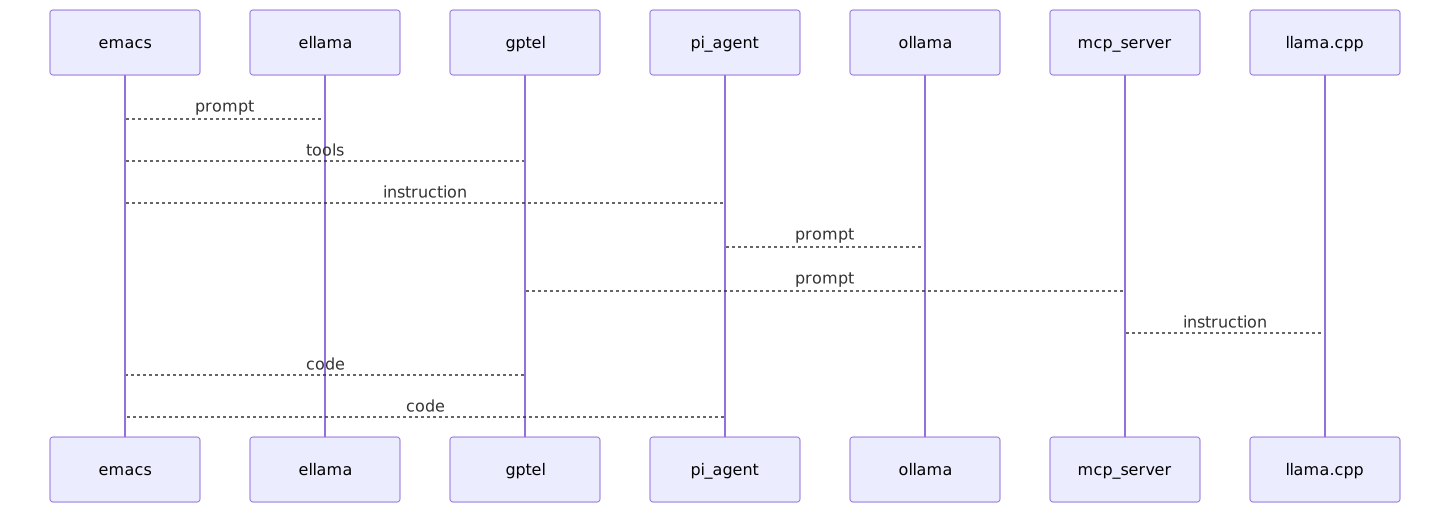
Figure 12: result of mermaid plot
.org files LLM integration
The most efficient way to integrate LLMs is to use and their capabilities. Org files contain many different tags which are interpreted as multiple entities.
- dates
- as agenda entries
- clock
- [C-c C-x TAB] to start logging the start of an activity
- nodes
- ID and ROAM_ALIASES to tag any section or file
- agenda
- to schedule a task or to set an alert [C-c a]
- tags
- to specify meta information for that section [C-c C-q]
- status
- whether an action is done or pending [Space - left/right arrow]
- trees
- explain hierarchical structures [::]
- code
- define code to execute `#+begin_src bash` `#+end_src`
- plots
- plot data with gnuplot
- link
- link to anything: files, websites, buffers, images…
- local org files
- open new buffers from shell
LLMs should be able to correctly find and update those tags and automate the work of logging what the user is doing.
knwoledge ellama dev
Ellama is an Emacs frontend for chatting with large language models via llm-ollama. Models run locally through Ollama – no cloud API needed.
- jdormit/emacs-opencode (https://github.com/jdormit/emacs-opencode) — native client: M-x opencode for sessions, opencode-ask for prompts, session management, and deep Emacs integration via emacs-mcp-server (read buffers, eval elisp, run compile commands)
- colobas/opencode.el (https://github.com/colobas/opencode.el) — port of my tools into gptel with LSP integration, diagnostics, symbol navigation, and agent presets
- rogs/opencode.el (https://git.rogs.me/rogs/opencode.el) — lightweight terminal-based integration using vterm or shell-mode with a transient menu
- xenodium/agent-shell (https://github.com/xenodium/agent-shell) — ACP-based native Emacs buffer for LLM agents, supports OpenCode as a backend
- tninja/ai-code-interface.el (https://github.com/tninja/ai-code-interface.el) — unified interface wrapping multiple CLI agents including OpenCode
emacs.el loads the whole ellama setup lazily via ellama-load-and-call
(emacs.el lines 810-815), which adds user-emacs-directory to the load
path and pulls in ellama_setup (=~/.emacs.d/ellama_setup.el). All
providers and helpers below are defined there, not in emacs.el.
Ellama connects directly to the LLM backend
Chat providers are built with make-llm-ollama (default
http://127.0.0.1:11434). Unlike gptel, it does not route through the MCP
server (the bottino/mcp FastAPI agent), so it has no access to the MCP
tools (ollama_list_models, camera_describe_scene, etc.) or the MCP
tool-call loop.
ellama_setup.el discovers providers dynamically at startup. The
codepath used is my-unsloth-list-models — it queries Unsloth’s
{UNSLOTH_URL}/api/inference/models and requires UNSLOTH_TOKEN (sent as a
Bearer token; Unsloth rejects unauthenticated model-list requests). Set
UNSLOTH_URL (default http://127.0.0.1:8889) to point at your Unsloth
server. my-ollama-list-models (Ollama’s /api/tags via OLLAMA_URL,
default http://127.0.0.1:11434) is present but currently not used — the
refresh helper was switched to the Unsloth source.
Listed model names appear in M-x ellama-switch-provider automatically after
a 3-second idle delay at startup (or instantly via
M-x my-ellama-refresh-providers), with a qwen2.5:7b fallback provider if
discovery fails.
Note: discovery lists Unsloth model names but builds make-llm-ollama
providers — the resolved names must be reachable through your chosen backend.
Key bindings
Ellama starts via the global keymap defined in ellama_setup.el:
| Key | Command | Description |
|---|---|---|
C-c w |
ellama |
Start a new chat session |
C-c C-c |
ellama-chat-send-last-message |
Send last message in chat buffer |
C-c e |
Ellama keymap | a ask / b better / c chat / d define / r code-review / s summarize / t translate / w webpage |
C-c f a |
ellama-ask-about |
Ask about selected region |
C-c f c |
ellama-code-complete |
Complete code in region |
C-c f r |
ellama-code-review |
Code-review selected region |
C-c f g |
ellama-improve-grammar |
Improve grammar |
C-c f w |
ellama-improve-wording |
Improve wording |
C-c f i |
ellama-chat |
Chat |
C-c f p |
ellama-provider-select |
Pick provider |
C-c f s |
ellama-summarize |
Summarize region |
C-c f t |
ellama-translate |
Translate region |
C-x e is deliberately left unbound by ellama so it keeps its stock meaning
kmacro-end-and-call-macro (macro execute); the ellama prefix uses C-c e.
Providers (models)
Defined in =~/.emacs.d/ellama_setup.el:
Default chat provider (ellama-provider)
- Model:
qwen3.5:9b - Embedding:
nomic-embed-text - Context: 8192 tokens (
num_ctx) - Used for: general conversation, questions
Coding provider (ellama-coding-provider)
- Model:
qwen2.5-coder:7b - Embedding:
nomic-embed-text - Context: 32768 tokens
- Used for: code generation, debugging, refactoring
- Activated via
M-x ellama-code(there is no dedicated prefix for it, but the coding provider can also be selected withM-x ellama-switch-provider)
Summarization provider (ellama-summarization-provider)
- Model:
llama3.2:latest - Embedding:
nomic-embed-text - Context: 32768 tokens
- Used for: summarizing regions, buffers, or files
Translation provider (ellama-translation-provider)
- Model:
qwen2.5:7b - Embedding:
nomic-embed-text - Context: 32768 tokens
Extraction provider (ellama-extraction-provider)
- Model:
qwen2.5-coder:7b-instruct-q8_0 - Embedding:
nomic-embed-text - Context: 32768 tokens
- Used for: structured data extraction from text
Naming provider (ellama-naming-provider)
- Model:
qwen2.5:7b - Used for: auto-naming new chat sessions (via
ellama-generate-name-by-llm) - Uses a
stopnon-standard param of a newline
Dynamic providers for interactive switching
ellama-providers is (re)built by my-ellama-refresh-providers from the
Unsloth model list at startup (my-unsloth-list-models), falling back to a
single qwen2.5:7b provider when discovery fails. Each entry embeds
qwen2.5:7b-style make-llm-ollama settings with nomic-embed-text and
32768-token context, so newly pulled models appear automatically in
M-x ellama-switch-provider.
interaction
Switch interactively with M-x ellama-switch-provider.
Start a chat
C-c e or M-x ellama
This opens a chat buffer in full frame. Type your message, then C-c C-c
to send.
Coding assistant
M-x ellama-code or select the coding provider interactively.
Ask for code, refactoring, or debugging help. The coding provider uses
qwen2.5-coder:7b with 32K context – suitable for whole functions or
small files.
Summarize text
Select a region, then M-x ellama-summarize or M-x ellama-summarize-region.
Ellama will summarize the selected text using the summarization provider.
Translate text
M-x ellama-translate – prompts for target language, then translates the
current region or buffer.
Extract structured data
M-x ellama-extract – extracts structured information from text (e.g.
names, dates, quantities from free-form text).
Use a different model
M-x ellama-switch-provider – pick from the dynamically-discovered
providers, or any other provider you define.
Display behaviour
- Chat buffer opens in full frame (
display-buffer-full-frame) — note thatellama_setup.eloverrides the chat/instant display action todisplay-buffer-no-windowat load (lines 5-6), so the interactive prompts stay unobtrusive. - Header line shows ellama context and session ID in all buffers
(
ellama-context-header-line-global-mode,ellama-session-header-line-global-mode).
Requirements
- Emacs ≥ 30
- An LLM backend reachable by
ellama_setup.el— either:- Unsloth, for dynamic model discovery (
UNSLOTH_URL, defaulthttp://127.0.0.1:8889; needsUNSLOTH_TOKEN); or - Ollama (
OLLAMA_URL, defaulthttp://127.0.0.1:11434) serving the chat models below
- Unsloth, for dynamic model discovery (
- Models expected (check with
ollama list):qwen3.5:9b(default chat)qwen2.5-coder:7b(coding)llama3.2:latest(summarization)qwen2.5:7b(naming, translation, fallback)qwen2.5-coder:7b-instruct-q8_0(extraction)nomic-embed-text(embeddings)
troubleshooting
| Symptom | Likely cause | Fix |
|---|---|---|
No provider available |
Ollama not running | systemctl start ollama |
Connection refused |
Wrong host/port | Check OLLAMA_HOST env or ollama serve |
| Model not found | Model not pulled | ollama pull qwen2.5:3b |
| Model exists in Ollama but not in ellama | Need to refresh provider list | M-x my-ellama-refresh-providers or wait for idle timer |
| Slow responses | Model too large for hardware | Use qwen2.5:3b instead of 7B variants |
| Context truncated | num_ctx too small |
Increase num_ctx in provider config |
Syncing models with Ollama dev
Ellama now discovers models dynamically at startup (with a 3-second idle delay so init isn’t blocked). When you pull a new model in Ollama, it appears automatically after restarting Emacs, or you can refresh on demand:
M-x my-ellama-refresh-providers
This queries Ollama’s /api/tags endpoint, filters out embedding-only
models (nomic-embed-text, all-minilm), and rebuilds the
ellama-providers alist with a make-llm-ollama entry per model.
Check which models are actually available
ollama list
or from Emacs:
M-x shell-command ollama list
Change the Ollama endpoint
By default, discovery hits http://127.0.0.1:11434/api/tags. To route
through the MCP server’s nginx instead, set:
MY_OLLAMA_URL=http://bottino:11434
or in Emacs:
M-x set-variable my-ollama-url "http://bottino:11434"
M-x my-ellama-refresh-providers
Refresh on pulling a new model
ollama pull deepseek-coder:6.7b
Then in Emacs:
M-x my-ellama-refresh-providers
M-x ellama-switch-provider → select deepseek-coder:6.7b
aider assistant
Useful commands
- /add
- <files> * Add files to the chat (Aider can edit them).
- /drop
- [files] * Remove files from the chat. No args drops everything.
- /ls
- List files currently in the chat.
- /read-only
- <files> * Add files for reference but block edits.
- /clear
- Clear the visible chat history.
- /reset
- Drop all files and clear history.
- /tokens
- * Print token usage for the current chat.
- /cost
- Show the running session cost.
- /code
- * Switch to code mode (or run one prompt in code mode).
- /architect
- * Switch to architect mode.
- /ask
- * Switch to ask mode (read-only).
- /chat-mode
- <name> Generic mode switcher.
- /context
- Enter context mode.
- /model
- <name> * Switch the main model on the fly.
- /models
- <query> Search the available models list.
- /editor-model
- <name> Switch the editor model.
- /weak-model
- <name> Switch the weak model.
- /think-tokens
- N Set thinking-token budget per turn.
- /reasoning-effort
- LEVEL Set reasoning effort for compatible models.
- /diff
- * Show the diff Aider just wrote.
- /undo
- * Revert the last commit Aider made.
- /git
- <cmd> Run a git command without leaving the agent.
- /commit
- [msg] Commit dirty changes manually.
- /run
- <cmd> * Run a shell command and feed the output into the chat. Alias: !.
- /test
- [cmd] Run the configured test command. Aider sees the output.
- /lint
- Run the configured lint command.
- /web
- <url> Fetch a URL and add the rendered text to the chat.
- /voice
- Voice input via Whisper. Requires portaudio.
- /paste
- Paste image or text from the clipboard.
- /copy
- Copy the last assistant reply to the clipboard.
- /copy-context
- Copy chat context as markdown.
- /load
- PATH Run a saved /command script.
- /save
- PATH Save the current session as a replayable script.
- /multiline-mode
- or /ml Toggle multi-line input.
- /vim
- Toggle Vim key bindings.
- /edit
- or /editor [cmd] Open $EDITOR for a long prompt.
- /map
- Print the current repo map.
- /map-refresh
- Force a repo-map refresh now.
- /settings
- Print effective settings.
- /ok
- Shorthand approval (used in Architect mode).
- /report
- Open a pre-filled GitHub issue with anonymised diagnostics.
- /help
- Aider answers questions about itself.
- /quit
- or /exit Exit cleanly.