Spiega documentation
- Knowledge sharing
- Portfolio
robotics utils
How do you build robotics applications.
tools
A list of tools used in robotics applications:
- ros/ros2
- RGB-D :: colors and depth
- structured light
- infrared pattern to estimate the depth (kinect)
- time of flight
- diffraction with bouncing light
- stereo vision
- using multiple cameras
- LiDAR
- Isaac sim :: framework on omniverse for robotics simulations
- bullet :: collision libraries
- genesis :: simulation platform for physical AI dev
- SLAM :: building a map as you explore the environment
- movelt :: A motion planning, manipulation, and kinematics framework for ROS
- CAD :: computer aided design
- URFD :: unified robots description
[ CAD Model ] –> [ URDF File (links, joints, sensors) ] –> [ RobotOps CI/CD Pipeline ]
v v [ Meshes (.stl/.dae) ] [ Simulators: Gazebo, RViz ] [ Controllers: ROS Control ]
computer-aided design (CAD), Unified Robot Description Format (URDF
ros2
We start with a simple example in ROS2 lyrical. We have nodes which communicate through ROS like:
- webserver
- actuators
- sensors
concepts
We have
We install ros2:
sudo apt update
export ROS_APT_SOURCE_VERSION=$(curl -s https://api.github.com/repos/ros-infrastructure/ros-apt-source/releases/latest | grep -F "tag_name" | awk -F'"' '{print $4}')
curl -L -o /tmp/ros2-apt-source.deb "https://github.com/ros-infrastructure/ros-apt-source/releases/download/${ROS_APT_SOURCE_VERSION}/ros2-apt-source_${ROS_APT_SOURCE_VERSION}.$(. /etc/os-release && echo ${UBUNTU_CODENAME:-${VERSION_CODENAME}})_all.deb"
sudo dpkg -i /tmp/ros2-apt-source.deb
sudo apt install -y python3-mypy  python3-pip python3-pytest python3-pytest-cov  python3-pytest-mock   python3-pytest-repeat python3-pytest-rerunfailures  python3-pytest-runner  python3-pytest-timeout ros-dev-tools
#sudo apt install ros-lyrical-desktop
colcon mixin add default https://github.com/colcon/colcon-mixin-repository/raw/master/index.yaml
colcon mixin update default
mkdir -p ~/lav/src/blender_twin/robot_ws/
mkdir -p ~/ros2_lyrical/src
cd ~/ros2_lyrical
vcs import --input https://raw.githubusercontent.com/ros2/ros2/lyrical/ros2.repos src
sudo apt upgrade
sudo rosdep init
rosdep update
rosdep install --from-paths src --ignore-src -y --skip-keys "fastcdr rti-connext-dds-7.7.0 urdfdom_headers"
colcon mixin add default https://github.com/colcon/colcon-mixin-repository/raw/master/index.yaml
colcon mixin update default
cd ~/ros2_lyrical/
colcon build --symlink-install --mixin release
Create a sample urfd file
#+begin_example <robot name=“simple_bot”> <link name=“base_link”> <visual> <geometry> <box size=“1 1 0.2”/> </geometry> <material name=“blue”/> </visual> </link> </robot> ,#+end_example
And launch the model
,*aiment* is the building system ,*colcon* is the building tool
,#+name: ros-launch ,#+begin_src bash :results output replace :async t :var urfd=urfd_file cd ~/lav/src/blender_twin/robot_ws/ echo $urfd > my_robot.urfd colcon build ros2 launch urdf_tutorial display.launch.py model:=my_robot.urdf #+end_src
Summary: 0 packages finished [0.11s]
turtle example
We launch the turtle agent
source /opt/ros/lyrical/setup.bash
/opt/ros/lyrical/bin/ros2 run turtlesim turtlesim_node
We launch the turtle remote controller
source /opt/ros/lyrical/setup.bash
/opt/ros/lyrical/bin/ros2 run turtlesim turtle_teleop_key
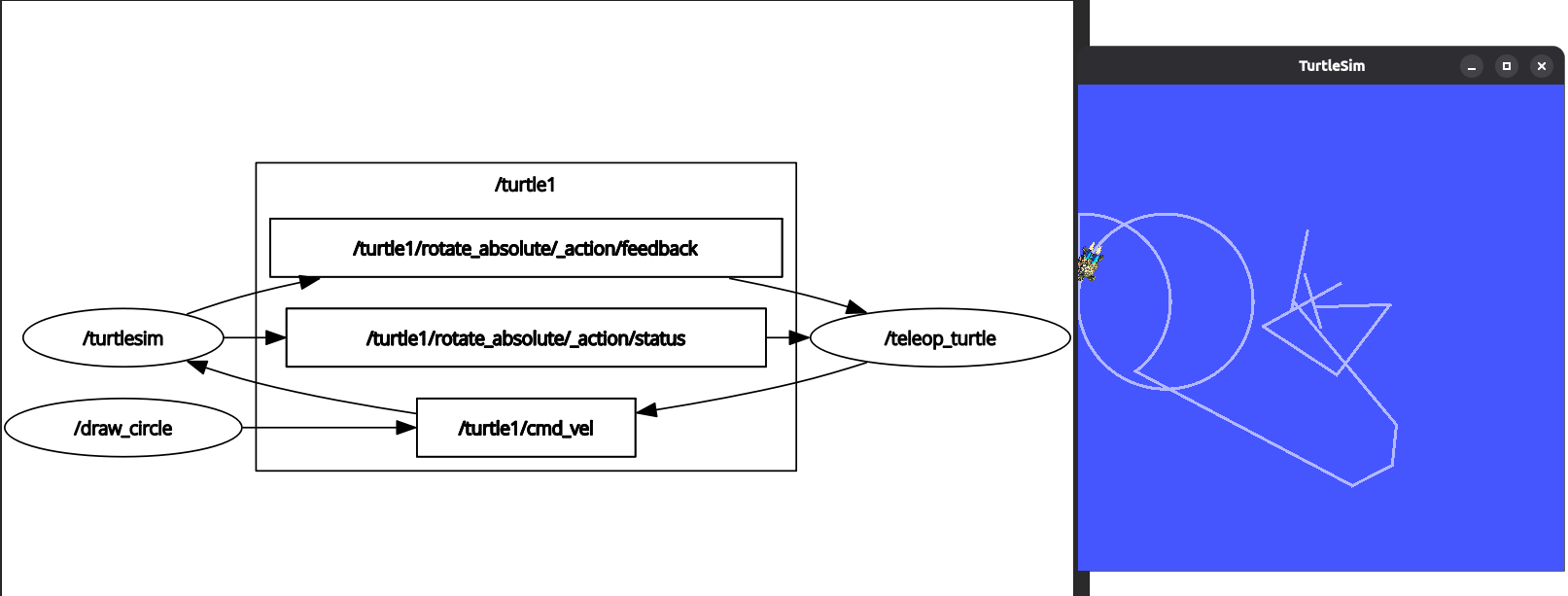
Show the graphs connecting nodes
#source /opt/ros/lyrical/setup.bash
. ~/ros2_lyrical/install/local_setup.bash
ros2 run rqt_graph rqt_graph
Or we can call the rqt application
source /opt/ros/lyrical/setup.bash
rqt
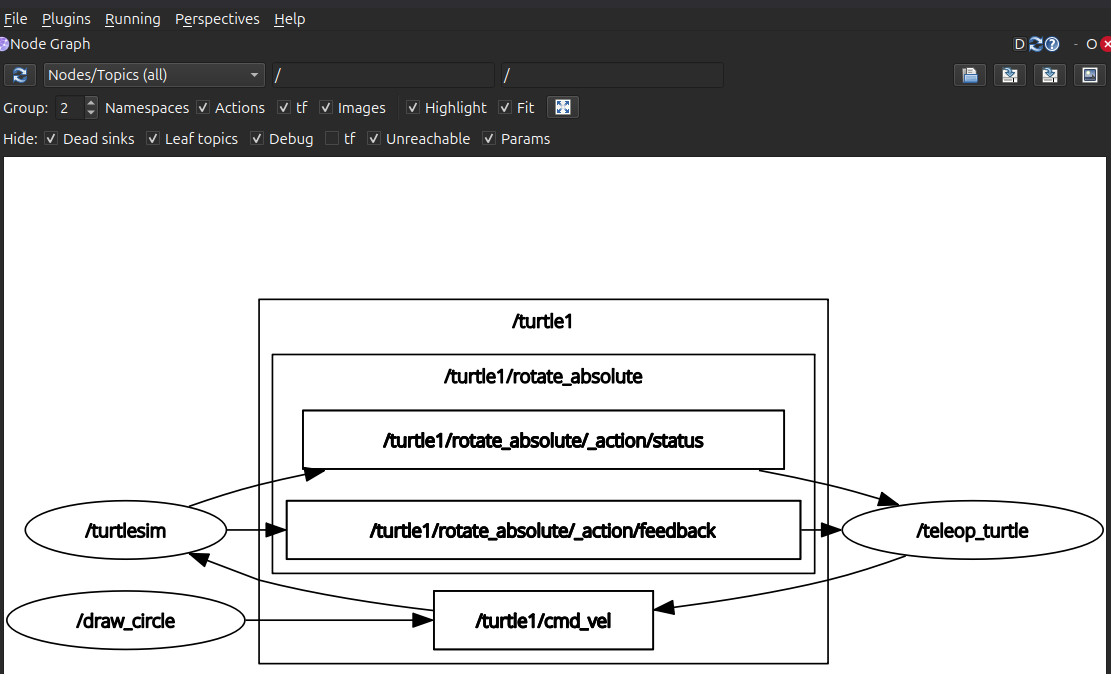
We look at the qrt_bag which manages and records bag files
source /opt/ros/lyrical/setup.bash
/opt/ros/lyrical/bin/rqt_bag
echo $COLCON_PREFIX_PATH
sudo apt install python3-colcon-common-extensions
source /usr/share/colcon_argcomplete/hook/colcon-argcomplete.bash
cd ~/lav/src/blender_twin/camera_esp32/src
colcon build
create package
source /opt/ros/lyrical/setup.bash
cd ~/lav/src/blender_twin/robot_ws
/opt/ros/lyrical/bin/ros2 pkg create bottino_controller --build-type ament_python
install ros (lyrical)
The python library is rlcpy
#sudo apt install python3-sphinx python3-sphinx-autodoc-typehints python3-sphinx-rtd-theme
source /opt/ros/lyrical/setup.bash
mkdir -p /tmp/rclpy_ws/src
cd /tmp/rclpy_ws/src
git clone https://github.com/ros2/rclpy.git
cd ..
colcon build --symlink-install
source install/setup.bash
cd src/rclpy/rclpy/docs
make html
coding
I create a python mcu_node.py and build the application
I add the command in the setup.py
entry_points={
    'console_scripts': ["mcu_node = bottino_controller.mcu_node:main"
    ],
},
With `–symlink-install` I don’t need to re-run the build after every python edit.
cd ~/lav/src/blender_twin/robot_ws
colcon build --symlink-install
Starting >>> bottino_controller
Finished <<< bottino_controller [1.21s]

Summary: 1 package finished [1.30s]
So I can use the module from everywhere
. ~/ros2_lyrical/install/local_setup.bash
cd /home/sabeiro/lav/src/blender_twin/robot_ws/bottino_controller
source install/local_setup.sh
ros2 run bottino_controller mcu_node
topics
We can subscribe to the different topics
source /opt/ros/lyrical/setup.bash
#ros2 run demo_nodes_cpp talker
#ros2 run demo_nodes_cpp listener
#ros2 topic echo /chatter
ros2 topic list
/chatter
/parameter_events
/rosout
interface
We look at the type
ros2 topic info /chatter
Type: example_interfaces/msg/String
Publisher count: 1
Subscription count: 0
source /opt/ros/lyrical/setup.bash
ros2 interface show example_interfaces/msg/String
# This is an example message of using a primitive datatype, string.
# If you want to test with this that's fine, but if you are deploying
# it into a system you should create a semantically meaningful message type.
# If you want to embed it in another message, use the primitive data type instead.
string data
publisher
We edit the package.xml by adding: <depend>rclpy</depend> and other useful libraries.
ros2 run turtlesim turtlesim_node
We write a python draw_circle.py to draw a circle around the turtle so we launch the turtle listener
import rclpy
from rclpy.node import Node

class DrawCircleNode(Node):
    def __init__(self):
        super().__init__("draw circle")
        self.cmd_vel_pub_ = self.create_publisher(Twist,"/turtle1/cmd_vel",10)
        self.get_logger().info("Drawing circle")

def main(args=None):
    rclpy.init(args=args)
    rclpy.shutdown()
We look at the structure of the turtle expected input
ros2 topic info /turtle1/cmd_vel
ros2 interface show geometry_msgs/msg/Twist
Type: geometry_msgs/msg/TwistPublisher count: 0Subscription count: 1# This expresses velocity in free space broken into its linear and angular parts.Vector3 linearfloat64 xfloat64 yfloat64 zVector3 angularfloat64 xfloat64 yfloat64 z
We install the node by updating setup.py and add the entrypoint “draw_circle = bottino_controller.draw_circle:main” and we build the application
cd ~/lav/src/blender_twin/robot_ws/bottino_controller
colcon build --symlink-install
Starting >>> bottino_controller
Finished <<< bottino_controller [4.20s]

Summary: 1 package finished [4.50s]
We then run the custom controller
. ~/ros2_lyrical/install/local_setup.bash
cd /home/sabeiro/lav/src/blender_twin/robot_ws/bottino_controller
source install/local_setup.sh
ros2 run bottino_controller
subscriber
We can use a subscriber for turtle
import rclpy
from rclpy.node import Node
from geometry_msgs.msg import Twist
from turtlesim.msg import Pose

class PoseSuscriberNode(Node):
    def __init__(self):
        super().__init__("pose_suscriber")
        self.pose_suscriber_ = self.create_subscription(Poes,"/turtle1/pose",self.pose_callback,10)

    def pose_callback(self, msg: Pose):
        self.get_logger().info("")

def main(args=None):
    rclpy.init(args=args)
    node = PoseSuscriberNode()
    rclpy.spin(node)
    rclpy.shutdown()
services
With services we have one server and unlimited clients
#ros2 run demo_nodes_cpp add_two_ints_server
ros2 service list
/add_two_ints
/add_two_ints_server/describe_parameters
/add_two_ints_server/get_parameter_types
/add_two_ints_server/get_parameters
/add_two_ints_server/get_type_description
/add_two_ints_server/list_parameters
/add_two_ints_server/set_parameters
/add_two_ints_server/set_parameters_atomically
ros2 service type /add_two_ints
example_interfaces/srv/AddTwoInts
ros2 interface show example_interfaces/srv/AddTwoInts
int64 a
int64 b
---
int64 sum
ros2 service call /add_two_ints example_interfaces/srv/AddTwoInts "{'a':2,'b':5}"
waiting for service to become available...
requester: making request: example_interfaces.srv.AddTwoInts_Request(a=2, b=5)

response:
example_interfaces.srv.AddTwoInts_Response(sum=7)
We can change the turtle path color
ros2 service call /turtle1/set_pen turtlesim/srv/SetPen "{'r':250,'g':0,'b':0,'width':6,'off':0}"
def call_set_pen_service(self,r,g,b,width,off):
    client = self.create_client(SetPen,"/turtle1/set_pen")
    while not client.wait_for_service(1.0):
        self.get_logger().warn("waiting for service")
    request = SetPen.Request()
    request.r = r
    request.g = g
    request.b = b
    request.width = width
    request.off = off
    future = client.call_async(request)
    future.add_done_callback(partial(self.callback_set_pen))

def callback_set_pen(self,future):
    try:
        request = future.results()
    except Exception as e:
        self.get_logger().error("Service call failed: %r" % (e))
We build the service
cd ~/lav/src/blender_twin/robot_ws/bottino_controller
colcon build --symlink-install
Starting >>> bottino_controller
Finished <<< bottino_controller [3.99s]

Summary: 1 package finished [4.28s]
Check the update frequency
ros2 topic hz /turtle1/pos
Created: 2026-10-09 Fri 12:57