Spiega documentation
- Knowledge sharing
- Portfolio
knowledge graph
knowledge graph
Knowledge graphs are used to organize and link the knowledge base. There are different tools to create an effective and searchable graph which can return useful result but the creation of those graphs is not trivial and creating a hierarchical structure without losing the essential information is pretty hard. Here we concentrate on different approaches using minimal tools.
graph creation
The creation of graphs requires a mixture of manual practices and automated techniques. One extreme is a language model building the connections, the other extreme is the user tagging all the sources. Is really important that the user to a certain degree creates the most relevant nodes while writing to be able to highlight the points which will be more relevant in the project. It is not granted that the LLM will grasp the relative importance of some points and creating too many nodes make search unusable.
- org-roam
- where you create nodes inside your documents and all your knowledge gets linked together.
- where LLMs need to parse your knowledge base
- naming
- LLMs are superior, users tend to give generic names and forget what they point to
- relevance
- users have better context to judge where nodes should be and why it's important to link there
- depth
- LLMs are great help to summarize any type of document (even long source code) but they hardly stress the relevance of the text
| conf | workload | control | relevance | usefulness | integration | depth | versatility |
|---|---|---|---|---|---|---|---|
| manual | 5.0 | 5.0 | 4,7 | 5.0 | 4.7 | 3.0 | 3.8 |
| automated | 2.0 | 3.0 | 3.4 | 3.7 | 3.8 | 5.0 | 3.6 |
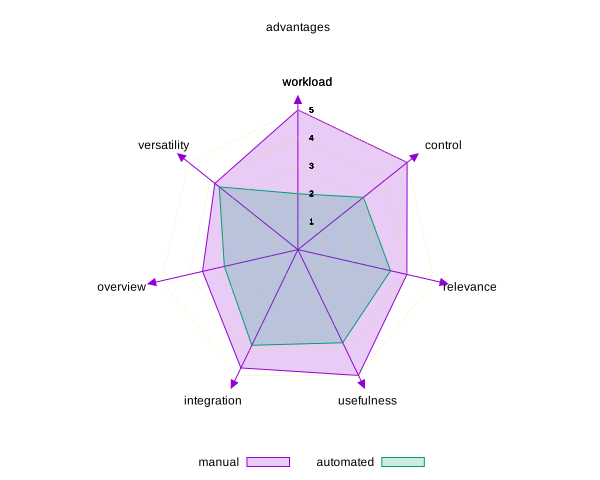
Figure 1: Manual vs automated knowledge creation
It is important to start the earliest to tag and create nodes in the documents to create the important links and references and make the content searchable and LLMs are a great tools to expand the tagging and description of files where never properly indexed. LLMs should as well help in updating frequently the information because there is nothing worse than obsolete, contradictory information.
visualize and navigate
The graph information can be retrieved by querying one database. Graphs contain one table of nodes and a table of links otherwise called entities and relationships.
Example of org-roam database exploration with elisp:org-roam-db-explore and query
(org-roam-db-query [:select * :from nodes])
Example of cypher neo4j query:
MATCH (n)-[r]->(m) RETURN *;
Some UI useful to navigate the database
- neo4j ui
- basic UI to visualize your graphs
- yFiles
- more advanced visualizer for jupyter notebooks
- org-roam-ui
- fully featured, nice looking and useful knowledge graph updating in real time while typing
done emacs present
Emacs integrates bash commands with macros and program outputs, I can connect language models with mcp servers. I currently use emacs.el as current init file and gptel_tools.el for connecting with mcp. gptel_tools_allowed commands is an additional list of bash commands which the tool allows
Features:
- LLMs
- I use different packages to interact with the local models
- ellama
- for reasoning and structuring the project and for code examples in any buffer
- gptel
- for the integration with mcp
- gptel base
- base package
- mcp.el
- start the hub
- custom gptel tools
- user defined tools
- gptel-mcp
- integration between the packages
- mcp
- for adding my own tools and external mcp
- aideremacs
- connect aider with emacs but was creating too much trash in the repository
- pi agent
- connect pi-agent with emacs
sequenceDiagramemacs-->ellama: promptemacs-->gptel: toolsemacs-->pi_agent : instructionpi_agent-->ollama: promptgptel-->mcp_server: promptmcp_server-->llama.cpp: instructiongptel-->emacs: codepi_agent-->emacs: code
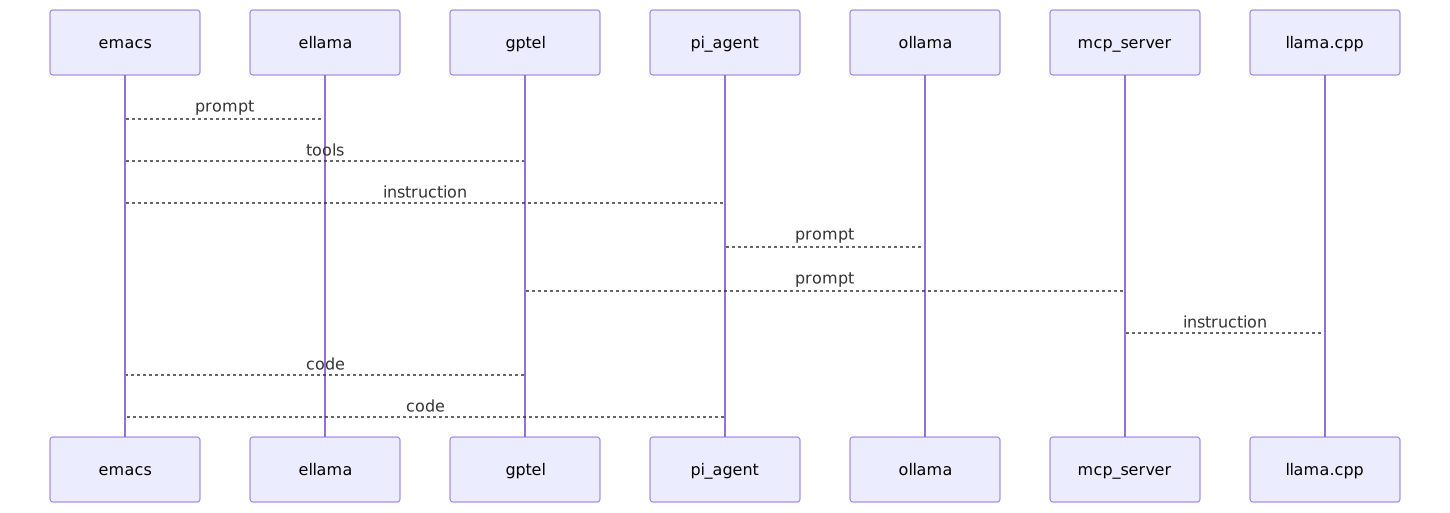
Figure 2: result of mermaid plot
done .org files present dev
The org mode is the most expressive way to structure projects or take notes.
.org files allow a really expressive integration of information:
- agenda
- to schedule a task or to set an alert [C-c a]
- tags
- to specify meta information for that section [C-c C-q]
- status
- whether an action is done or pending [Space - left/right arrow]
- trees
- explain hierarchical structures [::]
- formulas on tables
- nodes
- tag every element to create interconnections
- code
- define code to execute `#+begin_src bash` `#+end_src`
- graph
- interconnect elements
- plots
- plot data with gnuplot
- link
- link to anything: files, websites, buffers, images…
- local org files
- open new buffers from shell
- roam
- organizes the .org node information into graphs
.org file examples NOSLIDE
Add gptel tools like reading the content of a buffer
;; (insert (duckduckgo-search-text "intertino"))(defun my/read-buffer-content (buffer-name)(let ((buffer (get-buffer buffer-name)))(if (bufferp buffer)(with-current-buffer buffer(concat "[BUFFER CONTENT]: "(buffer_string)))"[ERROR]: Buffer does not exist")))(gptel-make-tool:name "get-buffer-content-as-string":function 'my/read-buffer-content:description "returns the string contents inside the emacs buffer":args '(list '(:name "buffer":type "string":description "buffer name to read")):category "emacs")
Display system information
| Headline | Time |
|---|---|
| Total time | 0:00 |
Call internal endpoint
curl -s -X PORT http://localhost:9876/run -H 'Content-Type: applicationon/json -d {"text":"Add a cube at origin and rotate it by 90 degrees z"}'
List the file to edit
ls -S ~/lav/siti/spiega/markdown | tail -n 5
| LLM | token/s | H-index |
|---|---|---|
| qwen2.5 | 257.72 | 21.39 |
| qwen3.5 | 165.77 | 19.68 |
| llama3.2 | 71.00 | 11.50 |
| mistral | 134.19 | 14.33 |
| deepseek | 257.56 | 17.67 |
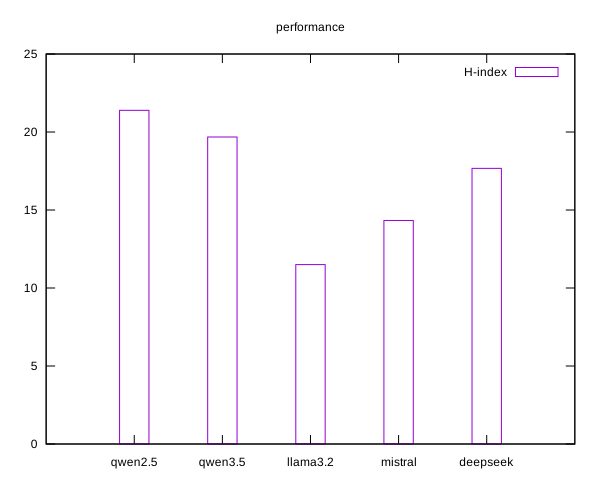
Figure 3: results of org plotting
Find relevant files
export fileL=$(rg --hidden --no-ignore -l "auth|token|nemo" | head -n)rg -l "auth|token" ./
Use context from another session
echo "ciccia" $fileL
gource
This package is mainly meant to review commit history of a repository:
cd ~/lav/src/spiega/gource