Spiega documentation
- Knowledge sharing
- Portfolio
emacs and LLMs
emacs and LLMs
Once your are used to emacs you are in control of your complete production workflow. You can control your complete ecosystem and organize your work staying in emacs. Configuring such a complex system requires a lot of configuration, some packages are really useful but they tend to collide. Configuring emacs is tricky, there is a lot of documentation to read and this is where LLMs can make the difference. We think pragmatically, we want to test whether the LLMs can bring a real value to our workflow and we need to decide where existing software is more suited.

Figure 1: risk of public models
scope
The purpose of this integration is to remove dependencies from external software and work with minimal org-files. Emacs already has multiple utils to make such a setup fit for managing big projects with the help of LLMs. We first of all work at a local single-user setup and think then how to make it work for a more complex environment. LLMs can be helpful but they have limitations and risks associated. We need to keep control of the project and its quality and let LLMs support with tasks which can be easily over-viewed. The things I want to improve in working with LLMs:
- maintainability
- LLMs often write code too hard to maintain and difficult to debug
- tools
- too often LLMs don’t use useful tools but write brand new code not using at best more efficient commands
- responsibility
- making sure we know how reliable is the product
- resilient
- too often LLMs cover a single use case
- ineffective
- often the code runs but doesn’t work, the tests are passed by data are not manipulated. They tend to put too many conditions and let the code run
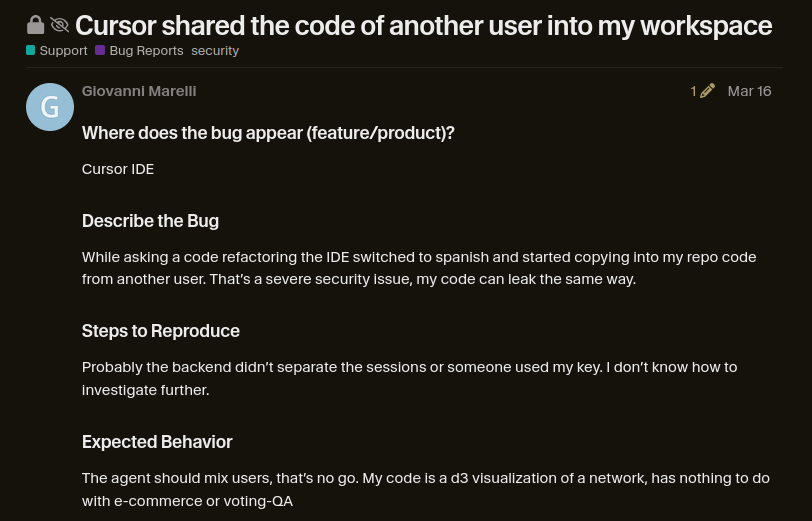
Figure 2: risk of public models
functions
It is tricky to have good performances with local models, there is a lot you need to balance. The best is to find the perfect combination of models and memory depending on the task. We want to make the best use of a gaming laptop and an nvidia jettison. A really cheap setup for local AI.
We have multiple LLM packages in emacs and we need to wisely distribute loads across such a tiny system. Usually the maximum size of a model we can run locally is 9B but for some tasks we should rather use smaller systems.
Let’s list first what we might need:
- autocompletion
- code or text completion based on the project most important files
- knowledge
- obtain information about softwares, tools, etc
- debug
- help in debugging code
- describe
- describe documents, images
- translate
- translate text from one language to another
- document
- support in writing documentation
- manage
- out of text file update all the project management tools
- agenda
- current tasks, dates, status
- tasks
- manage tasks and subtasks, and deadlines
- projects
- manage multiple tasks and their relationships
- workforce
- organize workforce and keep track of progresses
- link
- build links between ideas and concepts
constrains
Of course we know that nowadays this is possible with frontier LLMs but let’s say we want to manage everything with some constraints:
- emacs
- emacs is the interface for everything, this means LLMs are proficient with org-mode and lisp and can read package information
- local
- local LLMs only for privacy, cost, and sustainability
- reproducible
- no chat, everything should be managed by persistent files
- persistent
- files contains the information needed to replicate the project
- minimal
- the source of truth is always text (the images should be generated by text like in mermaid)
- updated
- the agent should scan the files and make sure the files contain the updated project information with no contradictions
- history
- history should be managed in a different format to not collide with the current status
implementation
We tested multiple packages for the integration of emacs with LLMs. We keep on reviewing all the options the more we work with them.
LLM providers
First of all you need to serve an LLM on your machine. I recently tested different LLM providers:
- ollama
- easy to install and configure but poor in performance
- unsloth
- pretty advanced tool for fine-tuning but I struggled reaching good performances
- llama.cpp
- it should be the most performant but I struggled to have good resource control on my machine llama_cpp
- vllm
- tricky to configure
- lmstudio
- the basic UI worked at the beginning but the API integration failed
- lemonade
- my current choice:
- lightweight
- small package
- hardware
- it makes the best use of CPU, NPU and GPU
- models
- highlights the best fitting models for the scope
- UI
- the user interface is simple but extensive
models
The list of local models we can use is limited and we need to get the best out of it:
- coding
- Llama-3.2-3B-Instruct-GGUF
- it looks weak
- Qwen-3.5-9B-GGUF
- usually my preferred option
- Qwen-3.0-0.6B-GGUF
- easy quick tasks
- Mistral-7B-Instruct-v0.3-GGUF
- a bit slow and sometimes
- deepseek
- weak
- Gemma-4-12B-it-GGUF
- to test for writing
- writing
- llama3.2
- image generation
- SD-Turbo
- melancholic style, not really sticking to the prompt
- stable-diffusion-xl-base-1.0-GGUF-Q8_0
- text2speech
- Moonshine-Medium-Streaming
- Whisper-Tiny
- object detection
- YOLOv4-12-1.1
- audio analysis
- DeepVoice-12-1.1
- audio synthesis
coding assistants
I used and tested different coding assistants. Since they have far too many access to the system I restrict their access putting them in a container where I can restrict the access to sensitive information and reduce the context.
- aider
- a lot of interactions, tiring aider
- opencode
- solid but not the most efficient
- pi-coding
- pretty efficient but sometimes too autonomous
pi-coding
Key Context Description C-c C-c input Send (queues if busy) C-c C-s input Queue steering message (busy only) C-c C-a global Insert active file region C-c C-k input Abort streaming C-c C-p both Open menu C-c C-r input Resume session M-p / M-n input History navigation C-r input Incremental history search TAB input Complete paths, @files, /commands @ input Agent or file reference n / p chat Navigate messages TAB chat Toggle thinking/tool section or fold turn S-TAB chat Cycle all folds RET chat Visit file at point (other window) f chat Fork from point q chat Quit session
coding skill
We can install a skill to generate skills
pi install git:github.com/S1M0N38/pi-skill-creator
And we tell pi to create a skill to get proficient with org files.
Create a skill in ~/lav/src/spiega/deploy/pi_coding/agent/skills/emacs/ to enable pi learning basic features of emacs, org, and lisp. We especially want a way to process org agenda and update visualization in mermaid You should be able to read an org file (drawer, sections, id, org-roam database, tasks, todos, tags…) and edit an org file (like project_visualization.org) editing only the block code of mermaid for example
emacs LLM packages
I used and tested different LLM packages and I want to find the best combination among those and the models they call.
Create a todo list out of this description
- ellama
- interface easy to integrate in buffer, it messes up the org files
- gptel
- nicely integrated in org-mode. Still need to have it proficient with emacs knowledge base emacs_ollama
- helm-LLM
- useful for using multiple models in one interface
- ollama-buddy
- pretty extensive, I need to explore it more
- minuet
- autosuggestions as you go, it has frequent interactions with the models making it pretty heavy and needs nevertheless good quality results to be useful. Most of the models just provide generic autocompletions
hardware
We want to be able to use all the resources:
- NPU
- Minuet NPU Configuration Guide
- GPU
- CPU
websearch
Agents have to search the web since they often hallucinate. We have a websearch docker to locally perform websearch.
curl -X POST http://localhost:8091/search \-H "Content-Type: application/json" \-d '{"query":"what is intertino.it","max_results":1,"format":"json"}'
<!DOCTYPE html><html class="no-js theme-auto center-alignment-no" lang="en-EN" ><head><meta charset="UTF-8"><meta name="endpoint" content="search"><meta name="description" content="SearXNG — a privacy-respecting, open metasearch engine">
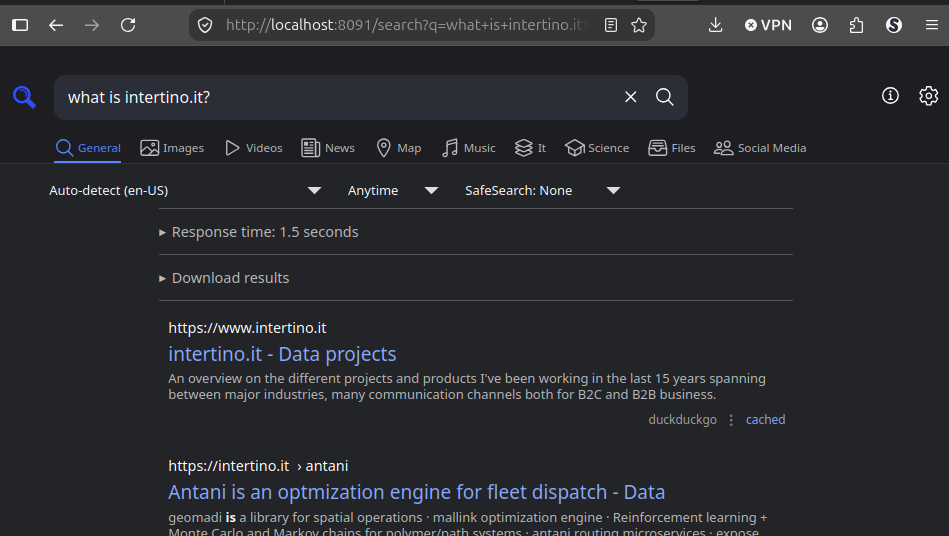
Figure 3: websearch local
websearch & elaborate
We use the same service for generating answers
curl -X POST http://localhost:8092/search \-H "Content-Type: application/json" \-d '{"query": "python async programming","search_depth": "basic","topic": "general","max_results": 5,"include_answer": true,"include_images": false,"include_raw_content": false,"time_range": "week","include_domains": ["docs.python.org"],"exclude_domains": ["pinterest.com"]}'
{"query":"python async programming","answer":null,"results":[{"title":"Developing with asyncio — Python 3.14.7 documentation","url":"https://docs.python.org/3/library/asyncio-dev.html","content":"Asynchronous programming is different from classic “sequential” programming. This page lists common mistakes and traps and explains how to avoid them.","score":1.0,"raw_content":null},{"title":"Novedades de Python 3.12 — documentación de Python - 3.12.14","url":"https://docs.python.org/es/3.12/whatsnew/3.12.html","content":"Se ha mejorado significativamente el rendimiento de escritura en sockets en asyncio. asyncio ahora evita copias innecesarias al escribir en sockets y usa sendmsg() si la plataforma lo admite.","score":1.0,"raw_content":null},{"title":"asyncio and free-threaded Python — Python 3.14.7 documentation","url":"https://docs.python.org/3/library/asyncio-threading.html","content":"vor 2 Tagen ... asyncio uses an event loop as a scheduler to enable highly efficient concurrency by switching between tasks to allow non-blocking I/O ...","score":0.5,"raw_content":null},{"title":"Event loop — Python 3.14.7 documentation","url":"https://docs.python.org/3/library/asyncio-eventloop.html","content":"The event loop is the core of every asyncio application. Event loops run asynchronous tasks and callbacks, perform network IO operations, and run subprocesses.","score":0.3333,"raw_content":null},{"title":"Built-in Functions — Python 3.14.7 documentation","url":"https://docs.python.org/3/builtins/functions.html","content":"This calls the __anext__() method of async_iterator, returning an awaitable. Awaiting this returns the next value of the iterator. If default is given, it is ...","score":0.25,"raw_content":null}],"images":[],"response_time":2.713}
search tools
import os, re, sys, jsonos.chdir(os.environ["HOME"] + "/lav/src/kotoba")import kotoba.model_local as m_cfrom ollama import chat, Clientimport requestsclient = Client(host='http://localhost:13305')llm = m_c.get_llm_chat()schema = requests.get("http://localhost:8092/tool-schema").json()response = client.chat(model="Qwen3.5-9B-GGUF",messages=[{"role": "user", "content": "Find recent news about AI"}],tools=schema["tools"],)result = requests.post("http://localhost:8091/search",json={"query": "recent AI news", "topic": "news", "max_results": 5},)
tools
Here we review different tools
ollama-buddy
In ollama-buddy the chat is not really helpful but we can add few interesting functions thanks to dyerdwelling.
internal knowledge
Ollama-buddy at first doesn’t know about itself. We need to do few things
sudo apt install texinfocd ~/.emacs.d/straight/repos/ollama-buddy/docsmakesudo make install-docsmakeinfo --html --no-split ollama-buddy.texi -o ollama-buddy.htmlpandoc -f html -t org -o ollama-buddy.org ollama-buddy.html
Now I can hit [C-c ?] in ollama-buddy buffer and access the internal documentation
RAG
We first load an embedding model:
(setq ollama-buddy-rag-embedding-base-url "http://localhost:13305")(setq ollama-buddy-rag-embedding-api-style 'openai)(setq ollama-buddy-rag-embedding-model "nomic-embed-text-v2-moe-GGUF-Q4_K_M")
To access the internal knowledge base we have (ollama-buddy-rag-index-directory “~/lav/src/spiega/storia”)
(setq ollama-buddy-rag-chunk-size 400) ; ~500 tokens per chunk(setq ollama-buddy-rag-chunk-overlap 50) ; 50-word overlap between chunks(setq ollama-buddy-rag-top-k 5) ; return top 5 matching chunks(setq ollama-buddy-rag-similarity-threshold 0.3) ; filter out low-relevance results
No existing index with file metadata. Performing full index… Indexing 160 files from home/sabeiro/lav/src/spiega/article… Created 1119 chunks from 160 files. Generating embeddings (112 batches)…
We can now search the index “storia-15a38ce7”
(ollama-buddy-rag-attach “a picture of a graph”)
Found 10 results:
JEV
Let’s try to use jev in emacs
functions
In v2 we can add tools to ollama-buddy:
We can enable them
(require 'ollama-buddy-tools)(setq ollama-buddy-tools-enabled t)
We can list the current tools
(ollama-buddy-tools-info)
We can register a new tool
(ollama-buddy-tools-register'my-tool"Description of what the tool does"'((type . "object")(required . ["param1"])(properties . ((param1 . ((type . "string")(description . "Parameter description"))))))(lambda (args)(let ((param1 (alist-get 'param1 args)))(format "Result: %s" param1)))t) ; t = safe tool
web search
To perform a web-search we add the @search instruction: what is @search(intertino.it website)
or call (ollama-buddy-web-search-attach “what is intertino.it?”)
We can set few options:
(setq ollama-buddy-web-search--current-results nil ;;List of current web search resultollama-buddy-web-search--history nil ;; History of web searchollama-buddy-web-search--inline-regexp "@search(\\([^)]+\\))"ollama-buddy-web-search--last-raw-results nil ;; Store last raw API results for debuggingollama-buddy-web-search-api-endpoint "https://ollama.com/api/web_search" ;;Endpoint for Ollama web searchollama-buddy-web-search-api-key ""ollama-buddy-web-search-content-source #'ewwollama-buddy-web-search-include-urls nilollama-buddy-web-search-max-results 5ollama-buddy-web-search-show-token-estimate tollama-buddy-web-search-snippet-length 500)
gptel
The init file is gptel_tools.el where we need to launch elisp:(gptel-load-and-call) to open a new buffer to connect with the backend defined in . In this file we open different MCP servers as well.
MCP
We init MCP together with gptel gptel_tools.el. We can monitor the status of the different MCP servers with elisp::(mcp-hub).
project structure
The idea is that we put the project scope and definitions in a folder like article/, the knowledge base (all the information that can be relevant to the project in knowledge/ and the project updated info in project.
article
This folder contains the description of the project, the executive summarize and important information about its scope and implementation. The description shouldn’t be too much detailed
knowledge
The knowledge base should be constantly improved and enriched with new data and insights as the project goes on. The content here can be quite detailed if needed. LLMs should periodically check the consistency of the information
project management
LLMs should exploit the capabilities of org-files to automate project management. org-agenda already has a lot of useful tools and agents should support and review making sure background processes work as expected.
- agenda.org
- update the calendar with tasks important dates
- diary
- update the diary with important events
- project_viz.org
- Gantt, kanban and timeline
- check-in.org
- the weekly report, the current status of the project