data storage
Principles and usage of databases for data infrastructure purposes,
docker-compose
provided.
volumes
It is always important to define external volumes connected with the database. Those volumes can be easily backed-up or synced on a cloud file system.
relational
Usage of relational databases in different projects.
postgres
Robust and stable database, used in different deployment as main database, great connections with BI tools and powerful geo spatial queries.
The useful files to create the container are under postgres .
Once created the credential for the root user
bash
POSTGRES_USER=${DB_USER}
POSTGRES_PASSWORD=${DB_PASS}
POSTGRES_DB=api_ingest
The correspondent docker-compose is:
yaml
services:
db:
image: postgres
restart: unless-stopped
env_file:
- postgres/database.env
ports:
- '127.0.0.1:5432:5432'
volumes:
- db-data:/var/lib/postgresql/data
- ./postgres/init.sql:/docker-entrypoint-initdb.d/create_tables.sql
- ./postgres/postgres.conf:/etc/postgresql/postgresql.conf
#command: postgres -c config_file=/etc/postgresql/postgresql.conf
healthcheck:
test: ["CMD", "pg_isready", "-U", "api_ingest"]
interval: 5s
retries: 5
networks:
- traefik-net
Connections to the database can be performed locally or with an orchestrator (swarm, kubernetes).
mysql - mariadb
Mariadb is an optimal option for websites and lightweight applications, it's more performant and stable than mysql
environment
bash
MARIADB_ROOT_PASSWORD=${DB_PASS_ROOT}
MARIADB_DATABASE=${DB_NAME}
MARIADB_USER=${DB_USER}
MARIADB_PASSWORD=${DB_PASS}
docker-compose
yaml
services:
mysql:
#image: mysql
image: mariadb
restart: unless-stopped
env_file:
- mysql/mariadb.env
#- mysql/database.env
volumes:
- ${HOME}/mysql-data:/var/lib/mysql
networks:
- webserver-net
users
We can define each access user with such queries:
sql
create user dash_ro with password '';
grant select on all tables in schema "public" to dash_ro;
ALTER DEFAULT PRIVILEGES IN SCHEMA public GRANT SELECT ON TABLES TO dash_ro;
presto
Presto is a very handy interface for querying non database sources like kafka
coordinator:
image: ahanaio/prestodb-sandbox
# ports:
# - "8090:8090"
container_name: "coordinator"
volumes:
- ./config.properties:/opt/presto-server/etc/config.properties
- ./local_postgres.properties:/opt/presto-server/etc/catalog/postgres.prop
erties
- ./kafka.properties:/opt/presto-server/etc/catalog/kafka.properties
- ./pass_auth.properties:/opt/presto-server/etc/password-authenticator.pro
perties
- ./password.db:/opt/presto-server/etc/password.db
- ./presto_keystore.jks:/opt/presto-server/etc/presto_keystore.jks
and properties
coordinator=true
node-scheduler.include-coordinator=true
http-server.http.port=8090
discovery-server.enabled=true
discovery.uri=http://localhost:8090
kafka
connector.name=kafka
kafka.nodes=kafka:9093
kafka.table-names=test_topic
kafka.hide-internal-columns=false
document
mongodb
python
import os, sys, gzip, random, csv, json, datetime, re
import numpy as np
import pandas as pd
import scipy as sp
import matplotlib.pyplot as plt
import geopandas as gpd
from scipy.spatial import cKDTree
from scipy import inf
import shapely as sh
import pymongo
baseDir = "~/raw/"
We initiate the client
python
with open(baseDir + '/credenza/geomadi.json') as f:
cred = json.load(f)
with open(baseDir + '/raw/metrics.json') as f:
metr = json.load(f)['metrics']
client = pymongo.MongoClient(cred['mongo']['address'],cred['mongo']['port'])
coll = client["index_name"]["collection_name"]
Returns all points within a distance
python
neiDist = 200.
nodeL = []
for i,poii in poi.iterrows():
poii = poi.loc[i]
poi_coord = [x for x in poii.ix[['x','y']]]
neiN = coll.find({'loc':{'$nearSphere':{'$geometry':{'type':"Point",'coordinates':poi_coord},'$minDistance':0,'$maxDistance':neiDist}}})
nodeId = []
for neii in neiN:
nodeL.append({'id_poi':poii['id_poi'],'src':neii['src'],'trg':neii['trg'],"maxspeed":neii['maxspeed'],'street':neii['highway']
,"x_poi":poii['x'],"y_poi":poii['y']
})
Take all locations inside polygons
python
motG = gpd.GeoDataFrame.from_file(baseDir + "gis/geo/motorway_area.shp")
cellL = []
for g in np.array(motG['geometry'][0]):
c = g.exterior.coords.xy
c1 = [[x,y] for x,y in zip(c[0],c[1])]
neiN = coll.find({'geom':{'$geoIntersects':{'$geometry':{'type':"Polygon",'coordinates':[c1]}}}})
neii = neiN[0]
for neii in neiN:
cellL.append({"cilac":str(neii['cell_ci']) + '-' + str(neii['cell_lac'])})
cellL = pd.DataFrame(cellL)
graph
neo4j
Neo4j is the most known graph database with an handy graphical interface
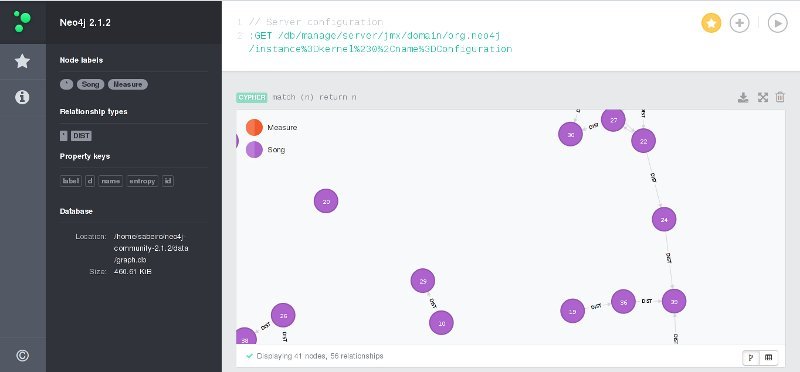
Neo4j UI
python
from neo4j.v1 import GraphDatabase, basic_auth
driver = GraphDatabase.driver("bolt://localhost:7687", auth=basic_auth("neo4j", "neo4j"))
session = driver.session()
session.run("CREATE (a:Person {name: {name}, title: {title}})",
{"name": "Arthur", "title": "King"})
result = session.run("MATCH (a:Person) WHERE a.name = {name} "
"RETURN a.name AS name, a.title AS title",
{"name": "Arthur"})
for record in result:
print("%s %s" % (record["title"], record["name"]))
session.close()
from py2neo import Graph, Path
graph = Graph()
tx = graph.cypher.begin()
for name in ["Alice", "Bob", "Carol"]:
tx.append("CREATE (person:Person {name:{name}}) RETURN person", name=name)
alice, bob, carol = [result.one for result in tx.commit()]
friends = Path(alice, "KNOWS", bob, "KNOWS", carol)
graph.create(friends)
from neomodel import StructuredNode, StringProperty, RelationshipTo, RelationshipFrom, config
config.DATABASE_URL = 'bolt://neo4j:test@localhost:7687'
class Book(StructuredNode):
title = StringProperty(unique_index=True)
author = RelationshipTo('Author', 'AUTHOR')
class Author(StructuredNode):
name = StringProperty(unique_index=True)
books = RelationshipFrom('Book', 'AUTHOR')
harry_potter = Book(title='Harry potter and the..').save()
rowling = Author(name='J. K. Rowling').save()
harry_potter.author.connect(rowling)
vector
Help to deploy language model applications
Vector embeddings are the distilled representations of the training data produced as an output from the training stage of the machine learning process