Spiega documentation
- Knowledge sharing
- Portfolio
data platform
A collection of docker images, middlewares, schedulers, jobs, UIs to set up a self managed analytical cluster.
principles
Industry standards following some modern principles:
- scalable architecture : cloud and microservice based
- secure : access restricted by purpose and aggregation level (ex. job access to granular data, finance reports to executive, monitoring data to operations...)
- compliant : anonymization of sensitive data, maximum retention period allowed, auditing compliant
- innovative : benchmark solutions should be evaluated and implemented if the migration time shows future benefits
- stable : release only after testing, monitoring and alerting put in place
- safe : data should be redundant and versioned
- talent catchy : tech stalk and challenges should be attractive to hire new resources
- shared knowledge : an easy to use and accessible document manager should contain all relevant company information
- agile : goals should be defined considering urgency and complexity, cost and benefits. Epics define the overall strategic goals, sprints the detailed operational tasks. Planning and retrospective should occur periodically
- collaborative : simple selection of admin tools, browser based, device agnostic
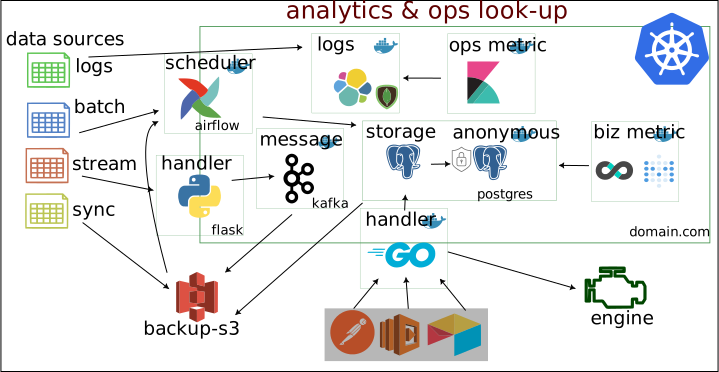
example of a data pipeline
main features
The whole stack is based on docker swarm where all the containers communicate through the same network. The ports are not exposed (apart from 80 and 443) and requests are redirected via the webserver (nginx) to the appropriate container. The main databases are postgres and kafka. Jobs are scheduled by airflow and multiples UI show the health of the system.
The main BI is metabase which is directly connected to postgres but connected to kafka
core
The core of the application is under sawmill .
The images of the middleware should be created beforehand running a script to build the image
live_py/docker_build.sh
and
go_ingest/docker_build.sh
.
Env variables should be executed running
~/credenza/database.env
. Alternatively variables can be defined inside of gitlab or using docker secrets.
Once the images are created
cd
into
docker/
and run
docker-compose up -d
environment
Before starting the services the credentials have to be created and exported so that the containers can start with the correctly defined variables as in this file
storage
After logging into the
db
contanier run the
sawmill
script putting the correspondent users passwords. This script creates the necessary database and user permissions for the services of the data platform
webserver
The webserver is moved to a separated folder
webserver/
where all the configuration about nginx, certbot and php are stored. There is a script to initiate all the certificates for the domains as defined in
database.env
.
After having created the certificates run the script
env_nginxConf.sh
to create the default confs for nginx and then start the services
docker-compose up -d
traefik/
contains the old and deprecated configuration of the reverse proxy.
messaging
The messaging system is inside the
/kafka
folder. Run
docker-compose up -d
to start the services.
Additionally to start presto (which will communicate between kafka and metabase) cd into
presto/
folder and start docker.
security and access
An infrastructure should be designed to be secure without sacrifice performance and operativity. Different access and restriction levels are applied to the different services.
gitlab-runner
gitlab runner is on a separated folder in case the instance should work as well as a runner.
scheduler
To activate the scheduler cd into the folder
airflow
and run
docker-compose up -d
.
The scheduler will be available under
schedule.yourdomain.com
.
UI
There are different UI to turn on/off depending on the state of the cluster maintenance. The main are
- docker-ui: manage and overview docker containers
- redpanda: UI for kafka streaming
- metabase: BI and data visualization
- airflow: schedule and monitor dags
Project structure
-
airflow/: configuration files for airflow -
dags/: list of jobs to run periodically -
db_connect/:golangbackend for db communication -
parse_sources/:pythonETL jobs -
docker/: docker compose file -
docker/postgres/: configurations and environment for postgres -
docker/db-data/: all the db data external from the container to backup -
docker/logs/: all the docker logs data -
docker/traefik/: configuration and routes -
terraform/: terraform configuration, currently on digital ocean
Test and Deploy
Use the built-in continuous integration in GitLab.
- [ ] Get started with GitLab CI/CD
- [ ] Analyze your code for known vulnerabilities with Static Application Security Testing(SAST)
- [ ] Deploy to Kubernetes, Amazon EC2, or Amazon ECS using Auto Deploy
- [ ] Use pull-based deployments for improved Kubernetes management
- [ ] Set up protected environments
Support
Open an issue tracker
Roadmap
- cluster : build the cluster, prepare the containers and link them
- central db : set up a central db (digital ocean?) and create an API
- platform integration : ad-hoc ETL, lambda, postman
- replace routines : decouple from the monolith to single services
- refining requirements : metrics, data structure, touchpoints
- API building : document with swagger
Contributing
Collaborate on the project
cd existing_repo
git remote add origin https://github.com/sabeiro/sawmill.git
git branch -M main
git push -uf origin main