antani
Ant - agent/network intelligence

ants optimizing paths on a network
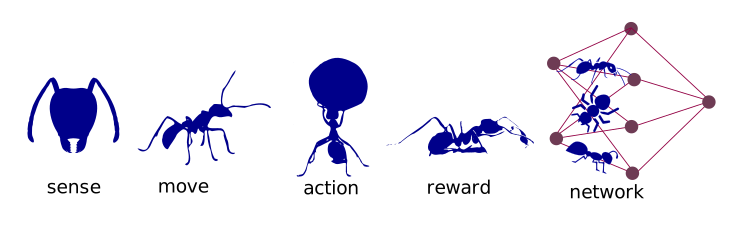
antani concept schema
infra
To deploy the engine we set up the hypervisor create and link different containers and check the routing and the services
bash
sudo yum -y install httpd php libapache2-mod-wsgi python-dev
...
sudo systemctl restart httpd.service
...
docker run -it --link redis1:redis --name $imgName -p $PORT:$PORT -v $(pwd):/$APP_DIR $imgName bash
...
curl $SERVER/antani
curl $SERVER/ant
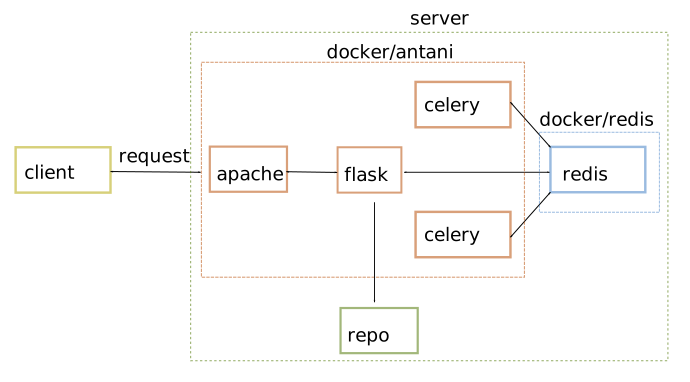
deployment of antani
server spec
baseUrl : $SERVER/antani
endpoint
Here is the list of end points and methods
-
/- post/get: checking the server -
/conf- post: change configuration -
/longtask- post: start the long process -
/status- get: current status of the process/worker -
/solvepost: start worker and returnsjob_id(routific format) -
/jobs- get: returns status/solution (routific format) -
/publish- get: solution is published (after manual inspection) -
/simplify- post: simplify the route -
/process- get: start serial routine -
/solution- get: return published solution
To try out:
sh
curl http://$URL/antani/simplify -d src/ui/antani_viz/data/sol_routific.json --header "Content-Type: application/json"
curl http://$URL/antani/solution --header "Content-Type: application/json"
curl http://$URL/antani/solve -d raw/opt/job_winter.json --header "Content-Type: application/json"
frontend
To visualize and edit the solution we have created a frontend
javascript
$.ajax({
type: "POST",
url: url,
data: JSON.stringify(data),
contentType:"application/json",
success: function(json) {
console.log(json);
if(Object.keys(geom).length !== 0){
sol = json;
geom = formatData(sol);
spotL = geom.spotL;
pathL = geom.pathL;
refreshLayer(spotL);
}
},
error: function(xhr, status, error) {console.log(status + '; ' + error);}
});
redirect
To avoid the browser to stop requests we have to redirect the calls on the server or client side
Cross-Origin Request Blocked: The Same Origin Policy disallows reading the remote resource
The jsonp options requires a lot of reingeneering and we opt for the apache solution. After a lot of trial and errors the only option working for ubuntu and centos is a proxy:
ProxyRequests Off
ProxyPass /antani http://localhost:5000
ProxyPassReverse /antani http://localhost:5000
backend
We create a flask app
python
app = Flask(
name
)
Where we can send the modified json
python
app.route('/simplify',methods=['POST'])
def route_simplify():
print("parsing/converting solution")
sol = request.get_json()
spotL, pathL = dict2frame(sol)
pO = p_o.pathOpt(spotL,pathL=pathL,conf=conf)
print("simplify - calc distances")
spotL1 = pO.simplifyRoute(spotL)
pathL1 = pO.calcDistance()
solD['solution'] = frame2dict(spotL1,pathL1)
return '', 204
and request the optimized solution
python
app.route('/solution')
def get_solution():
return jsonify(solD['solution'])
Which can be called via a get request
async
We create a celery

forum tips for killing
data structure
To complete the loop between optEn, backend and frontend we suggest the following data structure
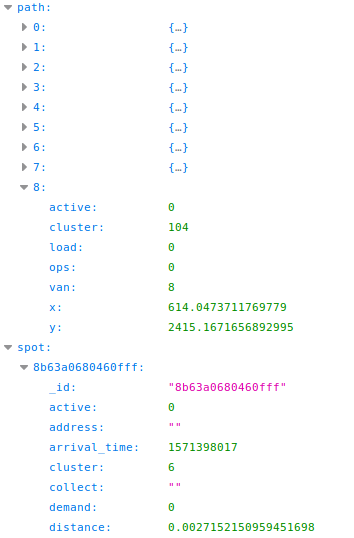
data structure
aws/productization
The solution is written on a s3 bucket
python
json.dump_s3 = lambda obj, f: s3.Object(key=f).put(bytes(json.dumps(obj).encode('UTF-8')))
json.dump_s3(solJ,jobN)
The lambda reads the solution from s3 and returns it
python
json.load_s3 = lambda f: json.load(s3.Object(key=f).get()["Body"])
post = json.load_s3(jobN)
return {
'statusCode': 200,
'body': json.dumps(post)
}
We create a lambda and connect it with the api gateway

lambda and api gateway
and we created the resources and methods for enabling the call

api gateway
We stardadize the script
bash
APP_NAME="antani_solution"
BUCKET="-------------"
ARN_ROLE="------------"
RESOURCE="solution"
REGION="eu-central-1"
ACCOUNT="------------"
LAMBDA_LINK="arn:aws:lambda:${REGION}:${ACCOUNT}:function:${APP_NAME}/$RESOURCE"
LAMBDA_URI="arn:aws:apigateway:$REGION:lambda:path/2015-03-31/functions/arn:$LAMBDA_URI"
ARN_SOURCE="arn:aws:execute-api:$REGION:$ACCOUNT:$API/prod/POST/$RESOURCE"
---------------------------------create-lambda---------------------------------
zip package.zip antani_lambda.py
aws lambda create-function --function-name $APP_NAME --zip-file fileb://package.zip --role $ARN_ROLE --environment Variables="{bucket_name="$BUCKET"}" --handler index.handler --runtime python3.6
--------------------------------test-lambda-----------------------------------
echo '{"jobN":"job_s592_v9_sol.json"}' > post.json
aws lambda invoke --function-name $APP_NAME --payload fileb://post.json outputfile.json
----------------------create-api------------------------------------
aws apigateway create-rest-api --name $APP_NAME > $APP_NAME.create.log
We can than perform a post request and test it
bash
curl -v -X POST \
'https://-------------.execute-api.eu-central-1.amazonaws.com/antani/solution/' \
-H 'content-type: application/json' \
-H 'x-amz-docs-region: eu-central-1' \
-d '{"jobN":"job_s592_v9_sol.json"}' > sol.json
moving to chalice .